WindAircraftSoundComponent
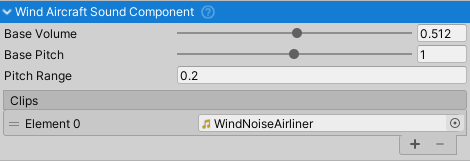
Purpose and Role
The WindAircraftSoundComponent produces ambient wind noise that responds to aircraft airspeed. This component creates realistic aerodynamic sound effects that scale continuously with velocity, independent of engine state or throttle position. Wind noise is always present when the aircraft is moving, providing immersive audio feedback for flight speed and air movement.
This component can be attached to the AircraftController or any child object. It automatically references the parent AircraftController to access airspeed data.
Component Setup
Requirements
- Parent Component:
AircraftController(anywhere in parent hierarchy) - Audio Clip: One looped wind/ambient sound clip
- Mixer Group: Routes audio through "Noise" mixer group
Audio Clip Configuration
The component uses a single audio clip for wind noise:
- Wind Sound - Ambient wind/air noise
- Should be looped content (seamless loop recommended)
- Volume and pitch scale with airspeed
- Typical: Whooshing wind, air turbulence, cabin air noise
- Should be neutral (not engine-specific)
Configuration Properties
Base Pitch (float, range 0-2) - Base frequency of wind sound
- Default: 0.5
- Lower values: Deeper, more muffled wind sound
- Higher values: Higher frequency wind noise
- Adjusted dynamically based on airspeed
Base Volume (float, range 0-1) - Base loudness of wind sound
- Default: 0.1 (10% of max)
- Multiplied by airspeed coefficient for final volume
- Controls overall wind sound presence
Pitch Range (float, range 0-5) - Maximum airspeed-dependent pitch shift
- Default: 0.2
- Lower pitch range = subtle pitch variation with speed
- Higher pitch range = dramatic pitch shift at high speeds
- Pitch scales linearly with airspeed coefficient
Trigger Conditions and Data Dependencies
The component continuously runs when enabled. Wind sound behavior depends on:
- Airspeed (from AircraftController) - Speed relative to air mass (m/s)
- Wind sound is always active and looping
- Volume scales with airspeed:
volume = baseVolume * clamp(airspeed * 0.01, 0, 1) - Pitch scales with airspeed:
pitch = basePitch + clamp(airspeed * 0.01, 0, 1) * pitchRange
Volume Scaling
The wind sound volume increases with airspeed in a linear relationship:
AirspeedCoefficient = clamp(Airspeed * 0.01, 0, 1)
Volume = BaseVolume * AirspeedCoefficient
This means:
- 0 m/s airspeed = 0% volume (silent)
- 50 m/s airspeed = 50% of base volume
- 100+ m/s airspeed = 100% of base volume (capped)
Pitch Modulation
Wind sound pitch increases proportionally with airspeed:
Pitch = BasePitch + AirspeedCoefficient * PitchRange
This creates a natural effect where higher speeds produce higher-pitched wind noise.
Realistic Airspeed Context
Wind sound provides audio feedback for aircraft speed:
- Parked (0 m/s) - No wind sound (silent)
- Taxi (5-10 m/s, 10-20 kts) - Subtle wind, mostly pitch increase
- Normal flight (50-100 m/s, 100-200 kts) - Full wind sound at mid-range volume
- High-speed flight (150+ m/s, 300+ kts) - High-pitched, loud wind noise
Audio Quality
To achieve realistic wind sound:
- Use high-quality wind/turbulence audio samples
- Ensure seamless looping (no clicks at loop points)
- Test pitch modulation range to match aircraft speeds
- Consider indoor (cockpit) vs outdoor sound character
Common Usage Patterns
Basic Setup
// Component automatically references parent AircraftController on Awake()
// Simply assign a wind audio clip and it works

WindAircraftSoundComponent windSound = GetComponent<WindAircraftSoundComponent>();

// Customize behavior
windSound.pitchRange = 0.3f;      // More pitch variation with speed
windSound.baseVolume = 0.15f;     // Louder wind sound overall
Monitoring Wind Sound Response
// Wind sound provides direct feedback of airspeed
float pitch = windSound.GetPitch();
float volume = windSound.GetVolume();

// Use for HUD display or data logging
Debug.Log($"Wind volume: {volume}, Pitch: {pitch}");
Speed Feedback
// Use wind sound characteristics for speed indication
windSound.SetVolume(0.5f);  // Manual control for special effects
windSound.SetPitch(1.5f);   // Set specific pitch for effects
Data Read Sources
The component reads these values from parent AircraftController:
Airspeed- Current airspeed in m/s- Primary input for volume and pitch modulation
- Updates continuously every frame
- Range: 0-300+ m/s depending on aircraft type
Audio Mixer Integration
The component outputs to the "Noise" mixer group and uses standard audio mixing:
- Single looping AudioSource
- Outputs through "Noise" mixer group
- Subject to parent
AircraftSoundManagerattenuation/filtering - Interior audio gets low-pass filter applied automatically
Interior vs Exterior Characteristics
Exterior
- Full wind sound at calculated volume and pitch
- Clear, bright wind noise
- Pitch increases dramatically with speed
Interior (with AircraftSoundManager)
- Wind sound attenuated (typically -7 dB)
- Low-pass filter applied (default 1600 Hz cutoff)
- Muffled wind noise characteristic of cockpit
- More realistic cabin audio simulation
Related Components
- AircraftController - Provides airspeed data source
- AircraftSoundManager - Central mixer and attenuation control
- EngineRunningAircraftSoundComponent - Engine sound (independent)
- CrashAircraftSoundComponent - Impact sounds (event-driven)
- EngineStartingAircraftSoundComponent - Engine startup sounds
AircraftSoundComponentBehaviour- Base class providing audio functionality