CrashAircraftSoundComponent
Purpose and Role
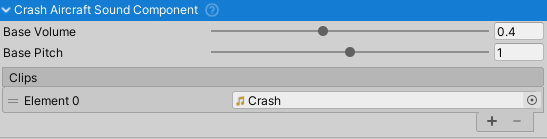
The CrashAircraftSoundComponent produces collision and impact sounds when the aircraft collides with objects. It responds to collision events with dynamic pitch and volume based on impact velocity, creating realistic crash audio feedback. The component supports multiple audio clips from which a random clip is selected each impact, providing audio variety for repeated collisions.
This component must be attached to the same GameObject as the AircraftController, which it monitors for collision events via the OnCollision event.
Component Setup
Requirements
- Parent Component:
AircraftController(must be on same GameObject) - Audio Clips: One or more collision/crash sound clips
- Mixer Group: Routes audio through "Crash" mixer group
Audio Clip Configuration
The component supports 1+ audio clips for variety:
- Crash Sounds - Collision impact effects
- Multiple clips recommended (2-4) for audio variety
- A random clip is selected each collision
- Volume and pitch vary based on collision intensity
- Typical: Thuds, impacts, material-specific sounds
- Range from light bumps to heavy crashes
Configuration Properties
Base Pitch (float, range 0-2) - Base frequency of crash sound
- Default: 0.5
- Lower values: Deeper, heavier crash sounds
- Higher values: Lighter, sharper impact sounds
- Modulated by collision intensity
Base Volume (float, range 0-1) - Base loudness of crash sound
- Default: 0.1 (10% of max)
- Scaled by collision velocity magnitude
- Controls overall crash sound presence
Pitch Randomness (float, range 0-0.5) - Variation range for crash pitch
- Default: 0.4
- Each collision gets random pitch in range:
[basePitch * (1 ± pitchRandomness)] - Prevents repetitive audio from similar collisions
- Value of 0.4 creates ±40% pitch variation
Velocity Magnitude Effect (float, range 0-5) - Impact velocity influence
- Default: 1.0
- Higher values increase volume more for same collision speed
- Controls sensitivity to impact velocity
- Range 0-5 for fine-tuning impact response
Trigger Conditions
Collision Detection
The component monitors AircraftController.OnCollision events:
- Triggered when aircraft collides with any object
- Receives
Collisionphysics data - Ignores rim/wheel collider impacts (no sound)
Sound Response
When a collision occurs:
- Collision data is captured
- Component checks if collision point was from rim collider (ignored)
- Selects random audio clip from available clips
- Calculates volume based on collision velocity
- Randomizes pitch around base pitch
- Positions sound at collision contact point
- Plays sound immediately if not already playing
Volume Calculation
CollisionVelocity = relativeVelocity.magnitude
Volume = clamp(CollisionVelocity * 0.025 * velocityMagnitudeEffect) * baseVolume
Examples:
- 20 m/s collision = 50% volume
- 40 m/s collision = 100% volume (capped)
- 80 m/s collision = 100% volume (capped)
Higher velocityMagnitudeEffect values amplify the velocity response.
Pitch Variation
RandomPitch = Random.Range(1 - pitchRandomness, 1 + pitchRandomness) * basePitch
Examples with basePitch 0.5:
- pitchRandomness 0.4: Range 0.3-0.7
- pitchRandomness 0.2: Range 0.4-0.6
Data Dependencies
The component reads from AircraftController and Collision physics data:
- OnCollision Event - Fired when aircraft collides
- Collision Data:
relativeVelocity.magnitude- Impact speed (m/s)contacts[0].point- Collision world positioncontacts[i].thisCollider.name- Collider name (filters rim impacts)
Special Behaviors
Rim Collider Filtering
The component specifically ignores collisions with colliders named "RimCollider":
// Checks all contact points
for (int i = 0; i < contactPoints.Length; i++)
{
    if (contactPoints[i].thisCollider.name == "RimCollider")
    {
        return; // Do not play sound
    }
}
This prevents unrealistic crash sounds from tire bouncing on ground.
Spatial Audio
Crash sounds are positioned at the collision impact point:
Source.transform.position = collisionData.contacts[0].point;
This creates spatial audio feedback where the sound comes from the impact location.
Playback Queuing
The component uses a deferred playback system:
- Collision flagged on physics collision
- Sound played next frame if not already playing
- Prevents multiple overlapping crashes from single event
Audio Quality
To achieve realistic crash sounds:
- Record or source varied impact sounds
- Use material-specific sounds if possible
- Vary pitch/volume ranges by aircraft type
- Test velocity sensitivity on actual aircraft
Common Usage Patterns
Basic Setup
// Assign 2-4 crash sound clips in inspector
// Component automatically registers for OnCollision events

CrashAircraftSoundComponent crashSound = GetComponent<CrashAircraftSoundComponent>();

// Customize behavior
crashSound.velocityMagnitudeEffect = 1.5f;  // More sensitive to speed
crashSound.pitchRandomness = 0.3f;          // Less pitch variation
crashSound.baseVolume = 0.15f;              // Louder crashes
Monitoring Collisions
// The component responds automatically to AircraftController.OnCollision
// To add custom crash behavior:

AircraftController aircraft = GetComponent<AircraftController>();

aircraft.OnCollision.AddListener((collision) =>
{
    if (collision.relativeVelocity.magnitude > 50f)
    {
        // Hard crash - could trigger damage, visual effects, etc.
        Debug.Log("Severe crash!");
    }
});
Audio Mixer Integration
The component outputs to the "Crash" mixer group:
- Outputs through "Crash" mixer group
- Subject to parent
AircraftSoundManagerattenuation/filtering - Interior audio gets low-pass filter and volume reduction applied
Related Components
AircraftController- Provides OnCollision eventsAircraftSoundManager- Central mixer and attenuation controlEngineRunningAircraftSoundComponent- Engine soundWindAircraftSoundComponent- Wind ambient soundEngineStartingAircraftSoundComponent- Engine startup soundsAircraftSoundComponentBehaviour- Base class providing audio functionality