EngineStartingAircraftSoundComponent
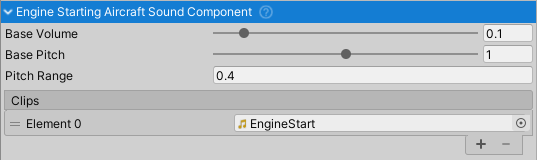
Purpose and Role
The EngineStartingAircraftSoundComponent produces engine startup and acceleration sounds when an aircraft engine is starting. It responds to engine state transitions and RPM changes to create realistic engine ignition and acceleration audio. The component plays only when the engine is in the "Starting" state and RPM is below stall RPM, simulating the characteristic cranking/startup sound before the engine reaches normal operating RPM.
This component must be attached to the same GameObject as an AircraftEngineBase component, which it monitors for engine state and RPM data.
Component Setup
Requirements
- Parent Component:
AircraftEngineBase(must be on same GameObject) - Audio Clip: One engine startup sound clip
- Mixer Group: Routes audio through "Engine" mixer group
Audio Clip Configuration
The component uses a single audio clip for startup:
- Engine Start Sound - Starter motor / engine startup
- Looped during starting sequence
- Pitch varies with engine acceleration (angular velocity)
- Typical: Cranking starter motor sound
- Plays from engine state Starting until RPM reaches stall RPM
Configuration Properties
Base Pitch (float, range 0-2) - Base frequency of startup sound
- Default: 0.5
- Lower values: Deeper, heavier starter/cranking sound
- Higher values: Lighter, faster-spinning starter sound
- Modulated by engine acceleration during start
Base Volume (float, range 0-1) - Base loudness of startup sound
- Default: 0.1 (10% of max)
- Fixed during startup (no dynamic modulation)
- Controls overall startup sound presence
Pitch Range (float, range 0-4) - Maximum RPM acceleration-dependent pitch shift
- Default: 0.4
- Controls how much pitch increases as engine speeds up during start
- Higher values create more dramatic pitch rise as engine accelerates
- Creates sense of engine ramping up to idle
Trigger Conditions
Startup Detection
The component monitors engine state through the target AircraftEngineBase:
- Plays when:
engine.state == EngineState.Starting AND engine.RPM < engine.stallRPM - Stops when: Engine reaches stall RPM or state changes from Starting
Sound Activation
The engine startup sound plays when both conditions are met:
- Engine state is Starting (cranking/ignition sequence)
- Engine RPM is below stall RPM (hasn't reached idle yet)
Once RPM exceeds stall RPM, the sound stops and is handled by EngineRunningAircraftSoundComponent.
Pitch Modulation
Pitch = BasePitch + (AngularVelocity / StallAngularVelocity) * PitchRange
The pitch scales with engine acceleration toward stall RPM:
- Engine starting (low angular velocity): Base pitch
- Engine accelerating: Pitch rises gradually
- Engine near stall RPM: Pitch reaches base + full pitch range
This creates the characteristic sound of a starter motor accelerating the engine.
Data Dependencies
The component reads from the target AircraftEngineBase:
AngularVelocity- Current engine rotational speed (rad/s)StallAngularVelocity- Engine speed at stall RPM thresholdState- Current engine state (Off, Starting, Running, Stopping)RPM- Current engine RPMStallRPM- RPM threshold for minimum stable operation
Engine State Integration
The component responds to engine states:
- Off - Startup sound stopped
- Starting - Plays with pitch rising toward stall RPM
- Running - Startup sound stops; handed to
EngineRunningAircraftSoundComponent - Stopping - Startup sound stopped
Real-World Startup Sequence
Typical engine startup sequence in aircraft:
- Idle - Engine off, starter available
- Cranking - Starter motor engaged, engine turning over
- Combustion Begins - Startup sound playing as RPM rises
- Stall RPM Reached - Engine stabilizes at minimum RPM
- Idle - Engine running normally, startup sound stops
Audio Quality
To achieve realistic engine startup sounds:
- Use actual starter motor or turbine starter recordings
- Ensure pitch range matches your aircraft's startup acceleration
- Test that RPM -> pitch correlation feels realistic
- Consider different sounds for piston vs turbine engines
Common Usage Patterns
Basic Setup
// Component automatically finds target engine on Awake()
// Assign engine startup audio clip in inspector

EngineStartingAircraftSoundComponent startSound = GetComponent<EngineStartingAircraftSoundComponent>();

// Customize behavior
startSound.pitchRange = 0.6f;      // More dramatic pitch rise
startSound.baseVolume = 0.2f;      // Louder startup sound
startSound.basePitch = 0.6f;       // Deeper starter sound
Engine Control Integration
// Engine starting is typically triggered by input or automation
EngineStartingAircraftSoundComponent startSound = GetComponent<EngineStartingAircraftSoundComponent>();
AircraftEngineBase engine = startSound.targetEngine;

// Manual engine start via script
engine.state = AircraftEngineBase.EngineState.Starting;

// Monitor startup progress
if (engine.RPM < engine.stallRPM &&
    engine.state == AircraftEngineBase.EngineState.Starting)
{
    // Engine still starting, startup sound should be playing
    float percentComplete = engine.AngularVelocity / engine.StallAngularVelocity;
    Debug.Log($"Engine startup: {percentComplete * 100}% to idle");
}
Multi-Engine Aircraft
// For aircraft with multiple engines, each engine gets its own startup sound
EngineStartingAircraftSoundComponent[] engineStartSounds = GetComponents<EngineStartingAircraftSoundComponent>();

// All engines starting in sequence
foreach (var startSound in engineStartSounds)
{
    startSound.targetEngine.state = AircraftEngineBase.EngineState.Starting;
}
Audio Mixer Integration
The component outputs to the "Engine" mixer group:
- Outputs through "Engine" mixer group (shared with
EngineRunningAircraftSoundComponent) - Subject to parent
AircraftSoundManagerattenuation/filtering - Interior audio gets low-pass filter and volume reduction applied
- Same mixer parameter control as running engine sound
Playback Behavior
Continuous During Start
The startup sound loops continuously while starting:
- Loops continuously while engine is in Starting state
- Plays immediately when component enabled
- Automatically stops when engine reaches stall RPM or exits Starting state
- Does not play on component awake if engine is not starting
Transition to Running Sound
When engine reaches idle RPM:
- Startup sound stops
- Engine transitioned to Running state
EngineRunningAircraftSoundComponentbecomes active- Seamless transition from startup to running engine sound
Related Components
AircraftEngineBase- Parent component providing engine state and RPM data- EngineRunningAircraftSoundComponent - Handles engine sound during normal operation
- AircraftSoundManager - Central mixer and attenuation control
AircraftSoundComponentBehaviour- Base class providing audio functionality