EngineRunningAircraftSoundComponent
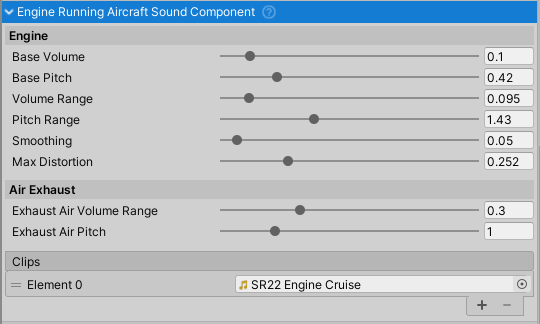
Purpose and Role
The EngineRunningAircraftSoundComponent produces realistic engine sounds during aircraft flight. It responds to engine RPM, throttle position, and engine state to modulate pitch and volume dynamically. The component supports two audio sources for rich engine audio: one for the core engine sound and one for exhaust/air noise at high RPM.
This component must be attached to the same GameObject as an AircraftEngineBase component, which it monitors for engine state and performance data.
Component Setup
Requirements
- Parent Component:
AircraftEngineBase(must be on same GameObject) - Audio Clips: Minimum 1 clip required (core engine sound); optionally 2 clips for realistic audio
- Mixer Group: Routes audio through "Engine" mixer group
Audio Clip Configuration
The component supports 1-2 audio clips with different purposes:
Engine Sound (Clip 0) - Core engine sound
- Looped during engine operation
- Pitch varies with RPM (base pitch + RPM modulation)
- Volume varies with throttle position
- Include distortion at high throttle/RPM
- Typical: Deep engine/propeller sound
Exhaust/Air Sound (Clip 1, optional) - High-RPM air/exhaust sound
- Looped only when engine RPM is high
- Volume scales cubically with RPM percentage
- Creates realistic turbulence noise at high power
- Typical: Whooshing or air rush sound
Configuration Properties
Engine Sound Parameters
Base Pitch (float, range 0-2) - Base frequency of engine sound
- Default: 0.5
- Lower values: Deeper, larger engine sound
- Higher values: Lighter, smaller engine sound
Base Volume (float, range 0-1) - Base loudness of engine sound
- Default: 0.1 (10% of max)
- Adjusted dynamically by throttle and engine state
Pitch Range (float, range 0-4) - Maximum RPM-dependent pitch shift
- Default: 1.6
- Controls how much pitch increases with engine RPM
- Higher values create more dramatic pitch variation
Volume Range (float, range 0-1) - Additional volume from throttle
- Default: 0.1
- Added to base volume based on throttle position
- Creates dynamic volume response to throttle input
Advanced Parameters
Max Distortion (float, range 0-1) - Distortion at maximum engine load
- Default: 0.4
- Applied to mixer "engineDistortion" parameter
- Higher values at high throttle/RPM simulate engine stress
- Stalling condition reduces distortion to 0
Exhaust Air Pitch (float, range 0-5) - Pitch of exhaust/air sound
- Default: 1.0
- Separate control for the secondary air rush sound
Exhaust Air Volume Range (float, range 0-1) - Exhaust volume scaling
- Default: 0.3
- Scales with RPM percentage cubed:
volume = range * (RPMPercent)^3 - Only active when RPM > 0.2 (engine running)
Smoothing (float, range 0-1) - Volume smoothing factor
- Default: 0.05
- Prevents abrupt volume changes from jittering
- Uses
SmoothDampfor natural volume transitions - Higher values = more lag but smoother transitions
Trigger Conditions
Engine Sound Activation
The engine sound plays when:
- Engine angular velocity > 0.2 rad/s (engine running)
- Component is enabled
Volume Response:
- Base volume + (throttle position × volume range)
- Reduced to 50% of base during stall
- Set to 0 when engine is off or stopping
Pitch Response:
- Base pitch + (RPM percentage × pitch range)
- Creates scaling effect: higher RPM = higher pitch
Exhaust/Air Sound Activation
The exhaust air sound plays when:
- Engine angular velocity > 0.2 rad/s (engine running)
- Clips list has 2+ entries with valid clip
- Component is enabled
Volume Response:
- Volume = (exhaust air volume range) × (RPM percentage)^3
- Cubic curve emphasizes high-RPM sounds
- Fades completely below 0.2 rad/s
Pitch Response:
- Fixed at exhaust air pitch value
- No RPM modulation for this sound
Engine State Integration
The component responds to engine states defined in AircraftEngineBase:
- Off - Sound stopped, volume set to 0
- Starting - Handled by
EngineStartingAircraftSoundComponent - Running - Full dynamic sound response to RPM and throttle
- Stopping - Volume reduced to 50% of base
Stall Detection
When stalling is enabled and engine is stalling:
- Volume forced to 50% of base volume
- Distortion parameter set to 0
- Creates characteristic stall sound
Audio Quality
To achieve realistic engine sound:
- Use good quality base engine samples
- Separate engine core and air rush into different clips
- Apply low-pass filtering for interior audio (via mixer)
- Test pitch range to match your specific engine sounds
Data Dependencies
The component reads these values from the target AircraftEngineBase:
AngularVelocity- Current engine RPM in rad/sRPMPercent- RPM as percentage of max (0-1)ThrottlePosition- Current throttle input (0-1)State- Current engine state (Off, Starting, Running, Stopping)IsStalling- Whether engine is in stall conditionStallingEnabled- Whether stall detection is active
Common Usage Patterns
Basic Setup
// Component automatically finds target engine on Awake()
// Assign audio clips in inspector:
// Clips[0]: Engine sound (required)
// Clips[1]: Exhaust sound (optional)

// Customize behavior
component.pitchRange = 2.0f;      // More pitch variation
component.maxDistortion = 0.6f;   // More distortion at load
component.smoothing = 0.02f;      // Faster volume response
Querying Engine State
EngineRunningAircraftSoundComponent engineSound = GetComponent<EngineRunningAircraftSoundComponent>();

// Access engine data through the component
float pitch = engineSound.targetEngine.RPMPercent;
float volume = engineSound.GetVolume();

if (engineSound.targetEngine.angularVelocity > 0.5f)
{
    // Engine running at reasonable RPM
}
Custom Audio Mixing
// Access mixer for distortion control
engineSound.audioMixerGroup.audioMixer.GetFloat("engineDistortion", out float distortion);

// Customize mixer behavior
engineSound.audioMixerGroup.audioMixer.SetFloat("engineDistortion", customValue);
Audio Mixer Integration
The component outputs to the "Engine" mixer group and uses these parameters:
engineDistortion- Applied based on throttle × RPM × maxDistortion- Range: 0-1
- Controls audio distortion effect
- Set to 0 during stall condition
All audio processing (low-pass filtering, attenuation) applied by parent AircraftSoundManager applies to this output.
Related Components
AircraftEngineBase- Parent component providing RPM and state data- EngineStartingAircraftSoundComponent - Handles engine startup sounds
- AircraftSoundManager - Central mixer and attenuation control
AircraftSoundComponentBehaviour- Base class providing audio functionality