AircraftSoundManager
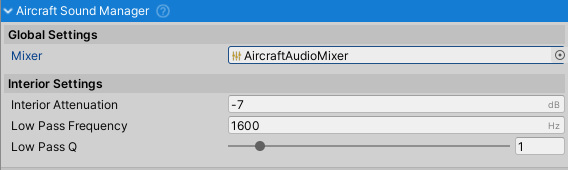
Purpose and Role
The AircraftSoundManager is the central audio control component for aircraft sound systems. It manages all AircraftSoundComponent instances attached to an aircraft and coordinates their audio output through a shared AudioMixer. The manager handles interior/exterior sound attenuation based on camera position and provides a unified audio mixing architecture for realistic sound behavior.
Architecture Overview
Component Hierarchy
The AircraftSoundManager operates within the aircraft's component structure:
AircraftController (with AircraftSoundManager attached)
├── AircraftSoundManager (central manager)
├── EngineRunningAircraftSoundComponent (engine sound)
├── WindAircraftSoundComponent (wind sound)
├── CrashAircraftSoundComponent (crash events)
└── (other sound components as needed)
Sound components can be attached to the same GameObject as the manager or to child objects. The manager automatically discovers and coordinates all child sound components.
Audio Mixing System
The manager uses an AudioMixer to:
- Route all aircraft sounds through a consistent audio system
- Apply global attenuation when camera is inside aircraft
- Apply low-pass filtering to simulate cabin audio characteristics
- Manage mixer group hierarchies for independent control
The default audio mixer (AircraftAudioMixer) includes:
- Master group - Main output mixing point
- Attenuation parameter - Controls volume reduction inside aircraft
- LowPassFrequency parameter - Frequency cutoff for interior filtering
- LowPassQ parameter - Filter resonance/width control
Component Lifecycle
Initialization
- Awake() - Manager initializes and loads default mixer if not assigned
- Reference Resolution - Caches AircraftController parent reference
- Default Assignment - Loads default AudioMixer from Resources if needed
- Event Registration - Subscribes to camera enter/exit vehicle events
Camera-Based Audio Control
The manager responds to camera position changes to create immersive audio:
- Camera Inside Aircraft - Applies interior attenuation and low-pass filtering to simulate cabin audio characteristics
- Camera Outside Aircraft - Removes attenuation and filtering for exterior audio perspective
This is driven by events from AircraftController:
onCameraEnterVehicle- Triggered when camera enters aircraft cockpit/cabinonCameraExitVehicle- Triggered when camera exits aircraft
Configuration Properties
Audio Mixer
- Mixer (AudioMixer) - The AudioMixer used to route all aircraft sounds. Leave null to load default mixer from Resources/NWH Aerodynamics/Defaults/Sound/AircraftAudioMixer.
The mixer must contain the following parameter groups and parameters:
- Group name should match sound component mixer group names
- Parameters:
attenuation,lowPassFrequency,lowPassQ
Interior Audio Attenuation
- Interior Attenuation (float, dB) - Volume reduction applied when camera is inside aircraft
- Default: -7 dB (approximately 1/4 original volume)
- Typical range: -6 to -12 dB
- More negative values = quieter interior audio
- Simulates sound dampening from cabin structure and headsets
Low-Pass Filter
The low-pass filter simulates audio characteristics of sound traveling through aircraft structure and cabin environment:
Low Pass Frequency (float, Hz) - Frequency threshold where attenuation begins
- Default: 1600 Hz
- Typical range: 1000-3000 Hz
- Lower values = more muffled interior audio (removes high frequencies)
- Simulates how aircraft cabin dampens higher frequencies
Low Pass Q (float, range 0.01-10) - Filter resonance/sharpness
- Default: 1.0
- Lower values = wider filter (gentler rolloff)
- Higher values = narrower filter (sharper rolloff)
- Controls how aggressively frequencies above cutoff are attenuated
Public API
Configuration Methods
- SetDefaults() - Ensures an AudioMixer is assigned, loading default if necessary. Called automatically on Reset.
Automatic Management
The manager automatically:
- Discovers all AircraftSoundComponent children
- Registers sound components with the mixer
- Applies attenuation changes when camera enters/exits vehicle
- Updates low-pass filter parameters for interior audio simulation
No manual registration of sound components is required; they automatically report to the manager through the shared mixer.
Audio Mixer Configuration
Standard Setup
The default AudioMixer includes these groups and parameters:
Groups:
Master- Main output, all aircraft sounds routed hereEngine- Engine-related soundsWind- Wind/ambient soundsCrash- Collision/crash sounds
Parameters:
attenuation- Master volume adjustment (dB)lowPassFrequency- Interior filter frequency (Hz)lowPassQ- Interior filter width
Custom Mixer Setup
To use a custom AudioMixer:
- Create AudioMixer with required groups and parameters
- Add parameter controls for:
attenuation(float, -80 to 0 dB range)lowPassFrequency(float, 20-22000 Hz range)lowPassQ(float, 0.1-10 range)
- Assign mixer to AircraftSoundManager in inspector
- Update sound component mixer group names to match
Sound Component Integration
Registration
Sound components automatically integrate with the manager through:
- Parent hierarchy (must be child of AircraftController)
- Shared mixer reference (loaded from manager)
- Mixer group mapping (component requests group by name)
Communication
Components communicate with the manager indirectly:
- All sounds route through assigned mixer
- Manager updates mixer parameters based on camera position
- Components observe parameter changes and adjust accordingly
Interior vs. Exterior Audio
Exterior (Default)
Normal audio playback
- No volume attenuation
- No low-pass filtering
- Full frequency range audible
- Natural aircraft sound characteristics
Example values set:
attenuation= 0 dB (original level)lowPassFrequency= 22000 Hz (no filtering)lowPassQ= 1.0
Interior
Muffled, cabin-like audio
- Reduced volume (typically -7 dB)
- High frequencies filtered out
- Simulates cabin structure audio dampening
- More realistic cockpit/cabin experience
Example values set:
attenuation= -7 dB (quieter)lowPassFrequency= 1600 Hz (muffle effect)lowPassQ= 1.0
Platform Considerations
- Desktop - Can handle more simultaneous sounds (8-16+)
- Mobile - More limited (4-8 depending on device)
- VR - Consider spatial audio and positional aspects
Common Usage Patterns
Accessing the Manager
AircraftController aircraft = GetComponent<AircraftController>();
AircraftSoundManager soundManager = aircraft.GetComponent<AircraftSoundManager>();

// Access mixer for custom parameter control
AudioMixer mixer = soundManager.mixer;
mixer.SetFloat("customParameter", value);
Custom Interior/Exterior Settings
// Customize interior audio characteristics
soundManager.interiorAttenuation = -10f;      // Quieter (more dB reduction)
soundManager.lowPassFrequency = 1200f;        // More muffled
soundManager.lowPassQ = 0.8f;                 // Wider filter

// Apply immediately if already inside
soundManager.SetDefaults();
Camera Simulation
The manager responds to these AircraftController events:
AircraftController aircraft = GetComponent<AircraftController>();

// Simulate camera entering cockpit
aircraft.onCameraEnterVehicle.Invoke();

// Simulate camera exiting cockpit
aircraft.onCameraExitVehicle.Invoke();
Custom Mixer Control
// Access mixer and adjust parameters directly
mixer.GetFloat("attenuation", out float currentAttenuation);
mixer.SetFloat("attenuation", -5f);  // Increase volume slightly

// Query current settings
mixer.GetFloat("lowPassFrequency", out float frequency);
Troubleshooting
No Audio Heard
- Check AudioMixer is assigned (or default loads successfully)
- Verify sound components are children of AircraftController
- Check AudioListener exists in scene
- Verify AudioSource volume and mixer levels are not zero
- Test with simple AudioSource to verify audio system works
Sound Components Not Initializing
- Ensure AircraftSoundManager is on same GameObject as AircraftController
- Check AircraftController reference resolves correctly
- Verify AudioMixer has required groups
- Check console for error messages from Awake()
Interior Audio Muffling Not Working
- Verify
onCameraEnterVehicleevents fire correctly - Check mixer parameters update (use Debug logs)
- Confirm AudioSource mixer group is set to correct group
- Verify low-pass filter is enabled in mixer DSP chain
Related Classes
- AircraftController - Parent container; fires camera enter/exit events
AircraftSoundComponentBehaviour- Base class for all sound components- EngineRunningAircraftSoundComponent - Engine sound during flight
- EngineStartingAircraftSoundComponent - Engine startup sound
- WindAircraftSoundComponent - Wind/ambient airflow sound
- CrashAircraftSoundComponent - Collision/crash impact sound
AudioMixer- Unity's audio mixing systemAudioMixerGroup- Routing point in mixer hierarchy