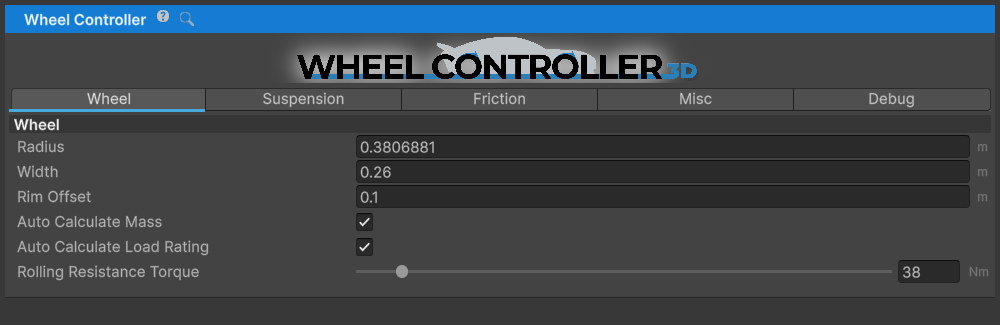
Wheel Controller 3D is a complete alternative to Unity's built-in WheelCollider, offering realistic vehicle behavior, full customization, and true 3D ground detection.
This asset is a part of NWH Physics World - a collection of inter-compatible vehicle simulation assets.
Setup Guide - Discord - Email - Unity Forum - YouTube
Key Features
- 3D Ground Detection - Wheel has width and length, not just a single point. Ground detection occurs over the entire bottom half of the wheel for realistic behavior on curbs, rocks, and uneven terrain.
- Familiar API - Almost identical to Unity's WheelCollider API, making it easy to swap and integrate with existing projects.
- Advanced Friction Model - Modified Pacejka friction model with preset system using ScriptableObjects for easy surface switching.
- Fully Customizable - Adjust spring, damper, friction curves, geometry, camber, caster, rim offset, and more through custom inspectors.
- High Performance - Optimized with multi-threading support. Typically 0.03ms CPU time per wheel.
- Runtime Adjustable - All parameters can be modified at runtime for dynamic vehicle behavior.
- Dual-Speed Dampers - Realistic shock absorbers with separate slow/fast bump and rebound settings for precise suspension tuning.
- Progressive Springs - Configurable spring progressiveness for comfort, balanced, or racing setups.
- Handles Visuals - Automatically manages wheel rotation, position, steering angle, and camber.
- Unity 6000 Compatible - Fully tested with Unity 6000 and URP.
- Full C# Source Code - Complete source code included for maximum flexibility.
What's Different from Unity WheelCollider?
Wheel Controller 3D improves upon Unity's WheelCollider with:
- True 3D contact detection instead of a single raycast point
- Realistic handling on complex geometry (curbs, rocks, uneven terrain)
- No more "stick wheels" that unrealistically climb vertical surfaces
- Adjustable wheel width that affects ground contact
- Dual-speed damper system for realistic shock absorber behavior
- Progressive spring curves for racing/comfort tuning
- Better integration with NWH Vehicle Physics 2 and other NWH assets
Physics Features
- Suspension System with spring and damper simulation
- Adjustable spring force and length with progressive spring curves
- Dual-speed bump and rebound dampers (slow/fast coefficients)
- Division velocities for smooth damper transitions
- Fully physics-based with realistic compression and rebound behavior
- Friction System powered by Pacejka Magic Formula
- FrictionPreset ScriptableObjects with BCDE parameters
- Easy surface switching (dry, wet, gravel, ice, racing slicks)
- Load-sensitive grip modeling
- Separate longitudinal and lateral friction curves
- Ground Detection with two modes:
- Sphere Cast: Fast single-cast mode (~0.02ms per wheel)
- Multicast: High-accuracy mode with multiple detection points (~0.03-0.05ms)
- Geometry Adjustments
- Camber angle with optional camber curves
- Rim offset for track width adjustment
- Caster and toe through Transform rotation
- Rolling resistance simulation
Documentation
- Setup Guide - Complete step-by-step setup instructions
- Vehicle model setup
- Adding wheel controllers
- Suspension configuration
- Friction preset system
- Friction Presets - Understanding and creating friction presets
- FAQ - Frequently asked questions
- Troubleshooting - Common issues and solutions
- Demos - Example scenes and vehicles
- Changelog - Version history and updates
- API Documentation - Complete API reference available in the navigation menu
Quick Start
- Import Wheel Controller 3D from Package Manager
- Add a Rigidbody to your vehicle model
- Create empty GameObjects at wheel positions
- Add WheelController components to these objects
- Parent your wheel meshes to the Rotating Container
- Add the CarController script (or use with NWH Vehicle Physics 2)
- Adjust suspension and friction settings
- Press Play!
For detailed instructions, see the Setup Guide.
Use Cases
Perfect for a wide variety of vehicles:
- Cars - sedans, sports cars, supercars, racing cars
- Trucks - pickups, delivery trucks, semi-trucks
- Off-Road Vehicles - SUVs, ATVs, monster trucks, rock crawlers
- Motorcycles - street bikes, dirt bikes, choppers
- Tanks - tracked vehicles with multiple wheels
- Multi-Axle Vehicles - 6x6, 8x8 configurations
- Custom Vehicles - any wheeled vehicle type
Included with NWH Vehicle Physics 2
Wheel Controller 3D is included in NWH Vehicle Physics 2, a complete vehicle simulation package with powertrain, sound, effects, modules, and more.
Other NWH Assets
- NWH Vehicle Physics 2 (Asset Store | Documentation) - Complete vehicle simulation (includes WC3D)
- NWH Dynamic Water Physics 2 (Asset Store | Documentation) - Water interaction and boat physics
- NWH Aerodynamics (Asset Store | Documentation) - Flight simulation and aerodynamics
- NWH Common (Documentation) - Shared utilities and components
Requirements
- Unity 6000.0.80f1 or newer
- Universal Render Pipeline 17.0.3 is a declared package dependency. The runtime physics code is not conceptually tied to a render pipeline, but the distributed package resolves URP.
- Works as standalone asset or with NWH Vehicle Physics 2
Support
For questions, problems, or suggestions:
- Email: [email protected]
- Discord: https://discord.gg/ubFBbM8
- Forum: Unity Forum Thread
Basic support is included with the asset. We typically respond within a few hours.