Friction Preset
FrictionPreset is a ScriptableObject containing data about the
friction properties of a tire.
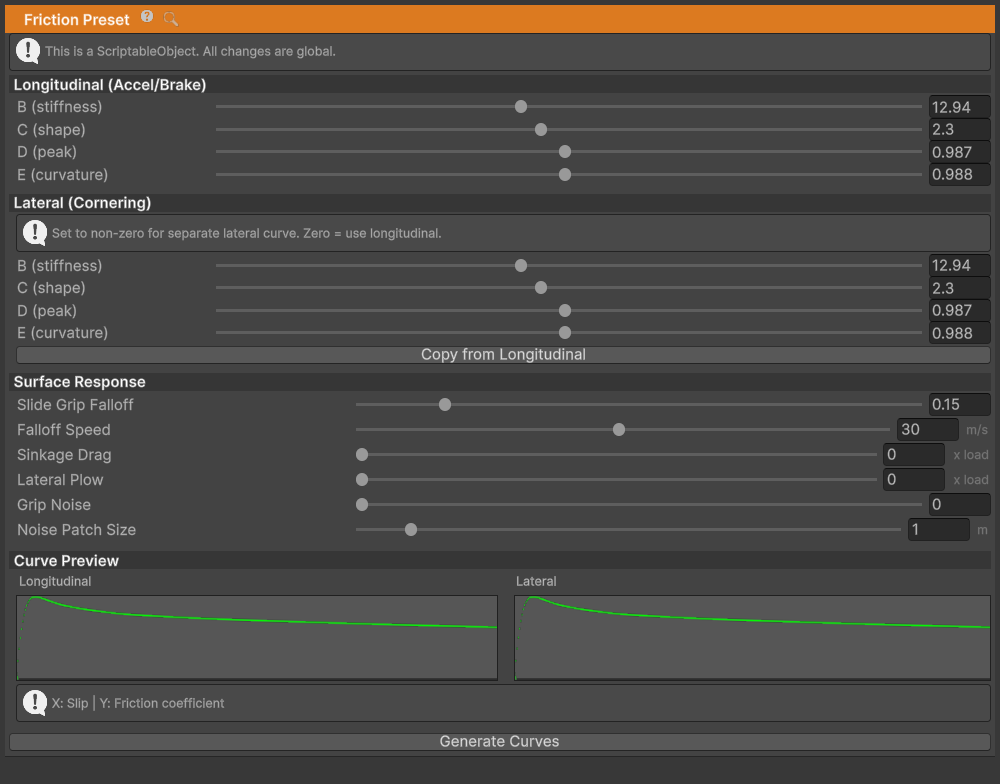
WheelController's friction is slip-based. Tire always has some slip
but it is very small under normal conditions – always near the left side
of the curve below.
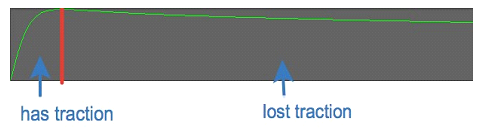
Image above shows friction curve with slip on the X axis and friction on the Y axis. Part of the curve on the left side marked as "has traction" is where tires normally operate, and part on the right side is where the tire lost traction. Depending on the shape of the curve vehicle will act differently upon losing traction.
Pacejka BCDE Parameters
The friction curve is defined using the Pacejka "Magic Formula" with four parameters:
B (stiffness)– With higher value curve will be faster to reach peak value meaning it will be steeper. This means that wheel will require less slip to lose traction and such vehicle will be more unstable – i.e. spin out more easily. With lower values of stiffness vehicle will be more stable and harder to spin but with very low value it will start to act as if on ice.
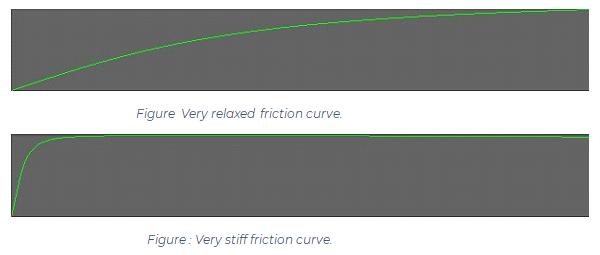
C (shape)– While stiffness determines where the peak will be, shape determines how strong the knee in the curve will be. High shape value will make it pointy while low value will make it flatter.D (peak)– The higher it is, the more traction the preset produces. Per-wheelStandardFriction.gripprovides an additional current longitudinal/lateral force multiplier. The grip capacity the solver actually uses - for the friction circle, the static break threshold and the low-speed force floor - is the true maximum of the generated curve, notD. The two are the same for a shape factor between 1 and 2; below 1 the real peak sits underD.E (falloff)- Determines how fast curve will fall off after the peak. It depends on other parameters but in general lower value will mean that curve ends closer to 0, and value of 1 will mean that it is almost horizontal after the peak. If set to low value vehicle will start to slide once traction is lost and if set to high value there will be almost no difference between "has traction" and "lost traction" parts of the curve.
Shipped Preset Values
The presets in Runtime/Friction/TireFrictionPresets are the reference point for a new one. The
assets are named <Name>TireFrictionPreset. Every shipped preset also fills in a separate lateral
curve, listed after the longitudinal one.
| Preset | B | C | D | E | Lateral B, C, D, E |
|---|---|---|---|---|---|
| Asphalt | 12 | 1.9 | 1.15 | 0.97 | 12, 1.8, 1.1, 0.75 |
| Asphalt Wet | 11 | 2.2 | 0.72 | 1.0 | 11, 1.8, 0.66, 0.75 |
| Generic | 10 | 1.9 | 1.0 | 0.97 | 11, 1.8, 1.0, 0.8 |
| Arcade | 14 | 1.7 | 1.15 | 0.98 | 12, 1.8, 1.15, 0.9 |
| Rock | 9 | 1.8 | 0.95 | 0.9 | 12, 1.8, 0.88, 0.78 |
| Gravel | 8 | 1.7 | 0.74 | 0.85 | 6.5, 1.8, 0.68, 0.8 |
| Grass | 6.5 | 1.85 | 0.45 | 0.8 | 6, 1.8, 0.4, 0.8 |
| Sand | 5 | 1.6 | 0.45 | 0.75 | 5, 1.7, 0.33, 0.8 |
| Snow | 4 | 2.0 | 0.32 | 0.7 | 6, 1.8, 0.28, 0.75 |
| Ice | 10 | 1.9 | 0.12 | 1.0 | 10, 1.8, 0.1, 1.0 |
| Tracks | 0.1 | 2.0 | 2.0 | 1.0 | 0.1, 2.0, 2.0, 1.0 |
Tracks is deliberately outside the road-tyre range: a stiffness of 0.1 pushes the peak past the
end of the lookup range, so grip keeps rising with slip instead of falling away after a peak. That
is what makes a tracked vehicle keep pulling while the tracks are slipping. It is not a useful
starting point for a wheeled vehicle.
The preset assigned to a wheel by default is Resources/Wheel Controller 3D/Defaults/DefaultFrictionPreset
(12.94, 2.3, 0.987, 0.988, same curve for both directions).
Stay near the values above for a road tyre. Shape above roughly 3, or falloff above 1, pushes the Magic Formula past the point where it still describes a tire - the curve would turn negative, which physically means the tire pushing along the slip instead of against it. Those regions are clamped to zero grip rather than reversed, so a preset tuned there will feel like ice rather than misbehave, but there is no useful tire in it.
Separate Lateral Curve
BCDELateral defines an optional second curve for the cornering direction. Left at zero (the default), the longitudinal curve is used for both directions.
Gotcha: lateral B, C and D must all be non-zero before the lateral curve is used. Because the formula is
D * sin(C * atan(...)), any one of them at zero makes the whole curve zero at every slip angle - a car with no cornering force at all. Setting one lateral slider and leaving the others is the common way to hit this. The inspector warns while the lateral parameters are only partly filled and keeps using the longitudinal curve until all three are set.
Use Copy from Longitudinal in the inspector as a starting point, then lower lateral D slightly for a car that slides wide before it spins.
Creating Friction Presets
To create a new FrictionPreset:
- Right-click in the Project window
- Select Create > NWH > Vehicle Physics 2 > Friction Preset
- Name the preset appropriately (e.g., "WetAsphalt", "GravelRoad")
- Adjust the BCDE parameters to match your desired surface characteristics
- Assign the preset to
WheelController > Active Friction Preset
The preset will automatically generate a preview curve based on your parameters.
Switching Presets at Runtime
Friction presets can be changed during gameplay to simulate surface transitions:
Partial example (surrounding MonoBehaviour, namespace imports, and preset fields omitted):
WheelController wheel = GetComponent<WheelController>();

// Switch to a different surface
wheel.activeFrictionPreset = gravelPreset;

// Or for all wheels on a vehicle
foreach (WheelController wc in vehicleWheels)
{
    wc.activeFrictionPreset = icePreset;
}
StandardFriction Component
In v14, friction calculation is handled by the StandardFriction component, which is automatically added alongside WheelController. It adds tuning parameters on top of the FrictionPreset.
Its inspector has three tabs: Dynamic Friction, Static Friction and Advanced.
Grip and Stiffness
On the Dynamic Friction tab.
Grip(Vector2) - Force multiplier applied to friction output.- X = Longitudinal (acceleration/braking direction). Default 1.0.
- Y = Lateral (cornering direction). Default 1.0.
- Values above 1.0 increase grip, below 1.0 reduce it.
- Use to fine-tune front/rear grip balance without creating separate presets.
Stiffness(Vector2) - Slip sensitivity multiplier.- X = Longitudinal. Default 1.0.
- Y = Lateral. Default 0.8.
- Higher values make the tire respond more aggressively to slip.
- Lower values create a more forgiving, progressive grip limit.
Load Sensitivity(Vector2) - How friction scales with vertical load.- X = Longitudinal. Default 0.85.
- Y = Lateral. Default 0.8.
- Value of 1.0 = linear scaling (unrealistic).
- Values < 1.0 = diminishing returns at high loads (realistic tire behavior).
- At high loads, tires become relatively less effective per Newton of load.
Partial example (assumes an initialized wheel reference):
StandardFriction friction = wheel.GetComponent<StandardFriction>();

// Increase rear grip for understeer
friction.grip = new Vector2(1.0f, 1.1f);

// Make front tires more progressive
friction.stiffness = new Vector2(0.9f, 0.7f);
Static Friction System
The static friction system prevents low-speed jitter and enables stable vehicle parking. When wheel velocity drops below a threshold, the system switches from slip-based dynamic friction to a spring-damper anchoring system.
Static Friction Parameters
These are on the Static Friction tab of the StandardFriction inspector. The serialized field
name is given where it differs from the label.
- Enabled (
staticFrictionEnabled) - master toggle. Off bypasses the hold entirely and runs dynamic friction only. Mainly a debugging switch. On by default. - Strength (
staticFrictionStrength) - scale for the holding force, 0-1. Default 1.0. 0 has the same effect as turning Enabled off. - Entry Speed Limit (
staticFrictionSpeedThreshold) - wheel velocity [m/s] below which static mode engages. Default 0.4. - Exit Speed Multiplier (
staticFrictionHysteresis) - the wheel must exceed (entry speed × this) to leave static mode. Default 1.5. Prevents mode flapping. - Damping (1.0 = Critical) (
staticFrictionDamping) - damping ratio for the anchor spring. Default 1.0, which is critical damping and does not overshoot. - Anchor Relax Rate (
staticFrictionAnchorRelaxRate) - per-substep rate at which the anchor creeps toward the current tread position once the vehicle has settled on near-flat ground. Default 0.02, 0 disables. It clears the residual spring force left over when four wheels capture their anchors at slightly different poses during the initial settle. It is gated on both near-stationary and low slope demand, so it does not weaken hill holding. - Break Threshold (
staticBreakThreshold) - multiple of the wheel's peak grip the applied force must exceed to break the hold. Default 1.15. - Unpowered Break (Trailers) (
unpoweredBreakThreshold) - the same threshold for a wheel with neither drive nor brake torque, being pushed along by its neighbours. Trailer wheels are the usual case. Default 0.8, so such a wheel gives up sooner than a driven one; raise it toward Break Threshold for a stronger trailer hold on a slope. - Drive Break Mode (
staticDriveBreakMode) - how throttle releases the hold.DemandGated(default) keeps the hold while the vehicle is at rest and a brake or handbrake is applied, so handbrake plus throttle holds on a slope.InputGatedbreaks the hold on any net drive torque. - Re-Entry Cooldown (
staticFrictionCooldownFrames) - delay before static friction may re-engage after being broken, counted in 5 ms reference substeps. Default 2, which is 10 ms of wall clock whatever substep rate the manager ends up using. Despite the field name it is not a count of real substeps and does not move with the solver rate.
Static Friction Stiffness
On the Advanced tab:
- Long Stiffness (
staticLongitudinalStiffness) - spring stiffness for the braking direction. Default 160. Higher values make the wheel "stick" more firmly when stopped. - Lat Stiffness Multiplier (
staticLateralStiffness) - multiplier of the longitudinal stiffness for the sideways direction. Default 1.0. Lower it to allow slight sideways drift on a slope while keeping the longitudinal hold.
Slope Handling
The static friction system includes automatic slope compensation. When parked on an incline, the system calculates the force needed to prevent rolling and applies it through the anchor spring. Vehicles can park on hills without drifting.
Breaking Static Friction
Static friction is automatically broken when:
- Applied force exceeds the break threshold
- Motor torque or brake torque is applied that overcomes static hold
- Wheel velocity increases above the exit threshold
Partial example (assumes wheel is an initialized WheelController):
StandardFriction friction = wheel.GetComponent<StandardFriction>();
friction.BreakStaticFriction(10); // 10 reference substeps of cooldown, i.e. 50 ms
Passing 0 uses the component's Re-Entry Cooldown. Pass true as the second argument
(clearFilterHistory) after a teleport or vehicle reset, so the next dynamic substep does not
blend against force values from before the jump.
Advanced Friction Tuning
Low-Speed Behavior
On the Advanced tab, under Low Speed Threshold and Low-Speed Transition:
- Surface Lock Speed (
lowSpeedSurfaceThreshold) - tire surface speed [m/s] below which the wheel counts as rotationally stopped. Default 1.5. - Full Force Speed (
lowSpeedSlipRampEnd) - speed [m/s] at which slip scaling reaches full. Default 1.0. - Min Force Scale (
lowSpeedSlipMinScale) - minimum slip scale at very low speeds. Default 0.95. Ramping rather than switching prevents jerky starts. - Lateral Min Scale (
lateralLowSpeedMinScale) - minimum lateral slip scale at the static-to-dynamic handover. Default 1.0, which applies no trim at all and recovers full lateral grip at the handover. Lower it to trim lateral force there. - Lateral Grip Floor (
lowSpeedLateralGripFloor) - at low slide speed, build lateral force toward the force needed to hold the slope up to this fraction of available grip immediately, instead of waiting for slip to develop over the slide. Default 0.9, 0 disables. This is what stops a vehicle sliding down a cross-slope the moment static friction lets go. Fades out above the static entry speed. - Lateral Slip At Peak (
lowSpeedLateralSlipAtPeak) - holds lateral slip at the curve peak below the static threshold. On by default.
Solver Configuration
On the Advanced tab, under Solver Settings. These tune the Newton solver.
- Convergence Threshold (
solverConvergenceThreshold) - error threshold for solver convergence. Default 0.01. - Max Iterations (
maxSolverIterations) - maximum Newton iterations. Default 20. Lowering this saves very little and can leave the solver short of convergence on a wheel that receives a large torque step in one substep, which shows up as a vehicle that barely creeps away. - Slip Regularization Eps (
slipDenominatorFloor) - regularisation epsilon for the slip denominator [m/s]. Default 0.3. Prevents division issues at very low speeds. Raising it too far saturates lateral grip at low speed and can leave a stationary vehicle sliding sideways. - Brake Blend Threshold (
brakeBlendThreshold) - wheel angular velocity [rad/s] below which the brake force direction is blended rather than snapped to the sign of rotation, which would otherwise flip back and forth as the wheel stops. Default 0.5. - Brake Lock Threshold (
brakeLockThreshold) - minimum brake torque [Nm] before wheel-lock handling is evaluated at all. Default 50. - ABS Pulse Interval (
absPulseInterval) - ABS pump cycle [s]. The brake modifier is sampled and then held for this long, as a real pump would. Default 0.05, i.e. 20 Hz. 0 resamples every substep.
Force Feedback
The StandardFriction component produces the aligning moment that force feedback reads. Two trail terms feed it, on the Advanced tab, and they behave differently on purpose:
- Pneumatic Trail (
pneumaticTrailCoefficient) - pneumatic trail as a fraction of wheel radius. Default 0.08. Collapses as the tire approaches its grip limit. This collapse is the lightening a driver feels when the front tires start to wash out, so it is the main understeer cue. - Mechanical Trail (
mechanicalTrailCoefficient) - caster trail as a fraction of wheel radius. Default 0.08. Does not collapse with slip, so the wheel keeps weight through a slide. Raise it if the steering goes completely dead at the limit, lower it if the understeer cue is masked.
Gotcha: the mechanical trail default was raised from 0.04 to 0.08 in 14.3.0. Defaults only apply to components added after the upgrade - a
StandardFrictionthat was already in a prefab or scene keeps the 0.04 it serialized, and its steering will still go light in a slide. Set it by hand on existing vehicles if you want the new feel.
The aligning moment is rebuilt from the final lateral force in every branch of the solver, including the low-speed static one, so force feedback does not step when a wheel locks, when TCS intervenes, or as the vehicle comes to a stop.
Troubleshooting Friction Issues
Vehicle Spins Out Too Easily
- Lower the B (stiffness) parameter in your FrictionPreset (try 6-8 instead of 10)
- Lower the lateral load-sensitivity exponent to create stronger diminishing returns at high loads
- Check that center of mass isn't too far forward
Vehicle Feels Like It's on Ice
- Increase the D (peak) parameter for more overall grip
- Check that you have the correct preset assigned
- Verify StandardFriction.grip values aren't set too low
Vehicle Jitters When Stopped
- Ensure static friction is on: Enabled ticked and Strength above 0
- Increase Damping if oscillation occurs
- Check that suspension damping isn't too low
Wheels Lock Up Too Easily
- Increase the stiffness.x value in StandardFriction
- Consider enabling per-wheel ABS in WheelController
- Check that load sensitivity isn't too high