Trailers
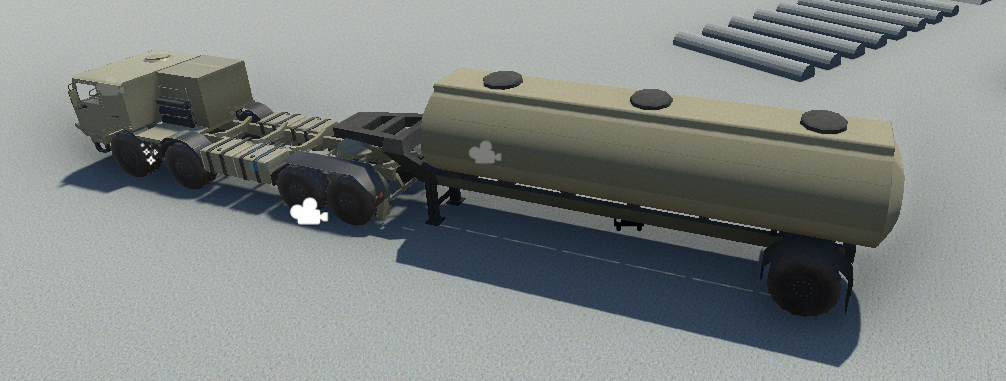
Demo truck and trailer in NWH Vehicle Physics 2.
Both truck and trailer in NVP2 use the same VehicleController script. Therefore, they should both be configured as a normal vehicle. Check Quick Start Guide for more info on vehicle setup.
- Towing vehicle needs to have TrailerHitchModule attached.
- Trailer vehicle needs to have TrailerModule attached. Click on the names of individual modules for more info.
Tips
- Since the trailer does not need all the vehicle components enabled as a full vehicle it is a good idea to use a separate
State Settingsfor the towing vehicle and the trailer. ExampleTrailerStateSettingsare included. - Due to the input mirroring between the towing vehicle and the trailer it is possible to use blinkers, effects, sounds, etc. on the trailer. It is even possible to make trailer powered by enabling
Powertrainin trailer's state settings.
Attaching Trailer
- Trailer is attached by driving the vehicle so that the attachment points of both vehicles are close and pressing the TrailerAttachDetach ("T" by default) button.
- Trailer attachment points work based on triggers. This is a SphereCollider whose radius can be set through the
TrailerModuleandTrailerHitchModuleinspectors.
Coupling setup
Create an empty child object at the hitch ball or trailer kingpin and assign it as the module's Attachment Point. Both modules need a matching Attachment Layer, and that layer must allow the coupling triggers to overlap in the physics collision matrix. The trigger radii determine how close the coupling points need to be. A trigger on an unrelated body collider is not a substitute for the assigned coupling point.
Trailer Stand is an optional object that supports the detached trailer. It is hidden when the trailer attaches. Reset Input States On Detach clears its mirrored controls on detachment; the trailer controller is disabled after detaching, so the stand and wheel support need to keep it resting correctly.
Enable Attach On Enable on the hitch if it should connect to a trailer already in range when the vehicle starts. Otherwise, use the attach/detach input. Detachable controls manual uncoupling. A finite Break Force, in newtons, can still break the joint even when manual detachment is disabled.
The normal coupling allows rotation on all three axes. Use Hinge Joint locks relative pitch and roll, leaving yaw free; use it when the articulation should turn sideways but should not twist or pitch independently. Check that this suits the vehicle before using it for a bus or another articulated body.
Road trains and dollies
NVP2 supports multi-trailer configurations (road trains) with the following features:
Connect/Disconnect Behavior
- Connecting: Always attaches the nearest trailer in range when multiple trailers are detected.
- Disconnecting: Configurable via
disconnectModeon TrailerHitchModule:Closest: Detaches the trailer directly attached to this vehicle.Furthest: Detaches the last non-dolly trailer in the chain.
Converter Dolly Setup
A converter dolly connects trailers in a road train (Truck → Dolly → Trailer).
- Create the dolly as a normal VehicleController.
- Add both
TrailerModule(front attachment) andTrailerHitchModule(rear attachment). - Set
detachable = falseon the dolly's TrailerHitchModule. - Configure attachment points at both ends.
- Optionally use
TrailerStateSettingsto disable the powertrain.
When a trailer's hitch has detachable = false:
- It's recognized as a connector and skipped in
GetTrailerCount(). - It's skipped when using
disconnectMode = Furthest. - Chain walking still includes it if
includeDollies = true.
Static-friction wake-up propagates along the attached chain so a trailer can move away with the towing vehicle. Keep the trailer's input and effects enabled if it needs working brake lights and blinkers.
The Trailer module and Trailer Hitch module are covered together in the Vehicle Controller manual.
If the trailer will not attach
Check both attachment-point assignments, their layers and trigger radii first. The towing vehicle's hitch module must be enabled and receiving the attach input. Its Trailer In Range display shows whether a trailer has been detected; the detached trailer's VehicleController can be disabled because its wrapper creates the coupling trigger independently.
If the connection breaks unexpectedly, check Break Force and look for body colliders that overlap when the attachment points line up. Test on level ground before adding a heavy load or a chain of trailers.