Trailer Module
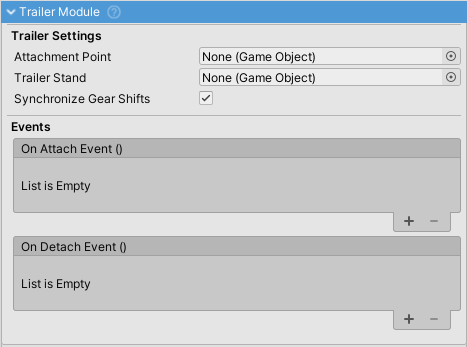
The trailer system consists of two modules:
- TrailerModule - Enables a vehicle to BE towed (attached to another vehicle)
- TrailerHitchModule - Enables a vehicle to TOW trailers
Both modules can exist on the same vehicle for road trains (truck to dolly to trailer chains).
Quick Setup
Basic Trailer Setup
- Add
TrailerModuleto your trailer's VehicleController - Create an empty GameObject as a child, position it at the trailer tongue/pin
- Assign this Transform to
Attachment Point - Set appropriate
Attachment Trigger Radius(0.2-0.4m typical) - Optionally assign a
Trailer StandGameObject
Basic Tow Vehicle Setup
- Add
TrailerHitchModuleto your tow vehicle's VehicleController - Create an empty GameObject as a child, position it at the hitch ball
- Assign this Transform to
Attachment Point - Set appropriate
Attachment Trigger Radius(0.3-0.6m typical)
Connecting
By default, press T when attachment points are close to connect/disconnect.
TrailerModule Properties
| Property | Type | Default | Description |
|---|---|---|---|
attachmentPoint |
Transform | - | Where trailer connects to hitch (tongue/pin location) |
attachmentTriggerRadius |
float | 0.2 | SphereCollider trigger radius for detection |
attachmentLayer |
int | - | Physics layer for detection (must match hitch) |
trailerStand |
GameObject | - | Landing gear, disabled when attached |
synchronizeGearShifts |
bool | false | Match towing vehicle's gear (powered trailers) |
resetInputStatesOnDetach |
bool | true | Clear inputs on detachment |
attached |
bool | false | Read-only: Is trailer currently attached? |
trailerHitch |
TrailerHitchModule | null | Read-only: Reference to attached hitch (runtime) |
Events
| Event | Description |
|---|---|
onAttach |
Triggered when attached to a towing vehicle |
onDetach |
Triggered when detached from a towing vehicle |
TrailerHitchModule Properties
| Property | Type | Default | Description |
|---|---|---|---|
attachmentPoint |
Transform | - | Hitch ball/coupling position |
attachmentTriggerRadius |
float | 0.4 | Detection trigger radius |
attachmentLayer |
int | - | Physics layer for detection |
attachOnEnable |
bool | false | Auto-attach trailers on scene start |
detachable |
bool | true | Can trailer be manually detached? |
breakForce |
float | Infinity | Joint break threshold in Newtons |
useHingeJoint |
bool | false | Lock lateral rotation (articulated buses) |
disconnectMode |
enum | Closest | Which trailer to disconnect (see below) |
noTrailerPowerCoefficient |
float | 1.0 | Engine power without trailer |
attached |
bool | false | Read-only: Is a trailer currently attached? |
attachedTrailerModule |
TrailerModule | null | Read-only: Reference to attached trailer (runtime) |
trailerInRange |
bool | false | Read-only: Is a trailer's attachment point in range? |
Events
| Event | Description |
|---|---|
onTrailerAttach |
Triggered when a trailer is successfully attached |
onTrailerDetach |
Triggered when a trailer is detached |
Connector Detection (Non-Detachable Hitches)
A trailer with a non-detachable hitch (detachable=false) is treated as a connector (e.g., converter dolly) and is automatically:
- Excluded from
GetTrailerChain(includeDollies: false) - Not counted in
GetTrailerCount() - Skipped by
DetachFurthestTrailer()
Why This Works
In European-style trailers, the dolly is permanently attached to the trailer as a single unit:
Truck ←[detachable=true]→ Dolly ←[detachable=false]→ Trailer
                          (dolly's hitch)
Since the dolly's hitch has detachable=false, it's recognized as a connector that shouldn't be counted separately. When you detach, the entire Dolly+Trailer unit separates from the truck.
detachable Property
| Value | Behavior |
|---|---|
true (default) |
Normal trailer - counted in chain, can be detached |
false |
Connector - skipped in chain counting, cannot be manually detached |
Note: Even with detachable=false, the joint can still break if breakForce is exceeded.
Disconnect Mode
The disconnectMode property on TrailerHitchModule determines behavior when pressing the detach key:
Closest Mode (Default)
Disconnects the trailer directly attached to this hitch:
Truck [TrailerHitchModule] ─── Dolly ─── Trailer
                          ↑
                     Disconnects here
Furthest Mode
Walks the chain and disconnects the last non-dolly trailer:
Truck [TrailerHitchModule] ─── Dolly ─── Trailer
                                              ↑
                                     Disconnects here
                                     (dolly stays attached)
This mode is useful for road trains where you want to drop cargo trailers one at a time while keeping dollies connected.
Multi-Trailer Chain API
Getting Chain Information
TrailerHitchModule hitch = vehicleController.GetComponent<TrailerHitchModuleWrapper>().module;

// Get all trailers in the chain
List<TrailerModule> allTrailers = hitch.GetTrailerChain(includeDollies: true);

// Get only cargo trailers (exclude connectors with non-detachable hitches)
List<TrailerModule> cargoOnly = hitch.GetTrailerChain(includeDollies: false);

// Get the last non-connector trailer
TrailerModule lastTrailer = hitch.GetLastTrailerInChain();

// Get count of actual trailers (excludes connectors)
int trailerCount = hitch.GetTrailerCount();
Manual Attachment/Detachment
// Attach a trailer programmatically
hitch.AttachTrailer(trailerModuleWrapper);

// Detach the directly attached trailer
hitch.DetachTrailer();

// Detach the furthest trailer in the chain
hitch.DetachFurthestTrailer();
Joint Configuration
The system uses Unity's ConfigurableJoint for the physics connection:
// Joint configuration applied automatically:
joint.xMotion = ConfigurableJointMotion.Locked;  // No X translation
joint.yMotion = ConfigurableJointMotion.Locked;  // No Y translation
joint.zMotion = ConfigurableJointMotion.Locked;  // No Z translation
joint.angularZMotion = useHingeJoint ? Locked : Free;
joint.enableCollision = true;
joint.breakForce = breakForce;
Ball Joint (Default)
useHingeJoint = false- Free rotation on all axes
- Standard for trailers, caravans, horse trailers
Hinge Joint
useHingeJoint = true- Locks lateral rotation (Z-axis)
- Used for articulated buses, logging equipment, fire truck ladders
Common Configurations
Standard Semi-Trailer
Truck (TrailerHitchModule: detachable=true)
  │
  └── Trailer (TrailerModule)
- Standard detachable trailer
- Press T to attach/detach
Articulated Bus
Front Section (TrailerHitchModule: detachable=false, useHingeJoint=true)
  │
  └── Rear Section (TrailerModule)
- Non-detachable, permanent connection
- No roll rotation (hinge joint)
- Rear section follows front
- Rear is skipped in chain counting (connector behavior)
European Trailer with Dolly
Truck (TrailerHitchModule: detachable=true)
  │
  └── Dolly (TrailerModule + TrailerHitchModule: detachable=false)
              │
              └── Trailer (TrailerModule)
- Dolly and Trailer form one permanent unit
- Dolly's hitch has
detachable=false→ recognized as connector GetTrailerCount()returns 1 (dolly skipped)- Pressing T detaches the entire Dolly+Trailer unit
Road Train (Multi-Trailer)
Truck (TrailerHitchModule: disconnectMode=Furthest)
  │
  └── Dolly (TrailerModule + TrailerHitchModule: detachable=false)
              │
              └── Trailer 1 (TrailerModule + TrailerHitchModule: detachable=false)
                              │
                              └── Dolly (TrailerModule + TrailerHitchModule: detachable=false)
                                          │
                                          └── Trailer 2 (TrailerModule)
- With
disconnectMode=Furthest, pressing T disconnects Trailer 2 - Trailers with non-detachable hitches (connectors) are skipped
GetTrailerCount()returns 1 (only Trailer 2, which has no non-detachable hitch)
Powered Trailer (Drive-On-Trailer)
Truck (TrailerHitchModule)
  │
  └── Trailer (TrailerModule: synchronizeGearShifts=true)
        └── Powered wheels (same gear as truck)
- Trailer has its own powertrain
- Gear shifts synchronized with towing vehicle
- Useful for very heavy loads
Attachment/Detachment Flow
Attachment Process
1. TrailerHitchModuleWrapper detects trailer's SphereCollider trigger
2. User presses T (TrailerAttachDetach input)
3. TrailerHitchModule.VC_FixedUpdate():
   ├── GetNearestTrailer() finds closest unattached trailer
   └── AttachTrailer(wrapper):
       ├── Positions trailer so attachment points align
       ├── Creates ConfigurableJoint
       └── Calls TrailerModule.OnAttach(this)
           ├── Disables trailer stand
           ├── Subscribes to towing vehicle enable/disable
           └── Sets attached = true
Detachment Process
1. User presses T while attached
2. TrailerHitchModule.VC_FixedUpdate():
   ├── If disconnectMode=Closest: DetachTrailer()
   └── If disconnectMode=Furthest: DetachFurthestTrailer()
3. DetachTrailer():
   ├── Returns early if detachable=false
   ├── Destroys ConfigurableJoint
   └── Calls TrailerModule.OnDetach()
       ├── Resets input states (if configured)
       ├── Enables trailer stand
       └── Disables trailer VehicleController
State Synchronization
When attached, the hitch synchronizes state from towing vehicle to trailer:
Input States
// Copied each FixedUpdate
trailer.input.states = towingVehicle.input.states;
Lights
// Light state synchronized
trailer.lightsManager.SetStateFromInt(towingVehicle.lightsManager.GetIntState());
Enable/Disable
The trailer subscribes to the towing vehicle's enable/disable events:
towingVehicle.onEnable += trailer.Enable;
towingVehicle.onDisable += trailer.Disable;
Static Friction Propagation
When the towing vehicle's wheels break static friction, it propagates to the trailer:
// In TrailerHitchModule:
_rigidbodyGroup.OnStaticFrictionBroke += PropagateStaticFrictionBreak;

private void PropagateStaticFrictionBreak()
{
    attachedTrailerModule.vehicleController.BreakStaticFriction();
}
Keeps the trailer from "anchoring" when the truck starts moving.
Input Handling
Default Key
- Attach/Detach:
Tkey (TrailerAttachDetach input)
Input Providers
| Provider | Mapping |
|---|---|
| InputManagerVehicleInputProvider | KeyCode.T |
| InputSystemVehicleInputProvider | InputAction "TrailerAttachDetach" |
| MobileVehicleInputProvider | MobileInputButton |
Custom Input
// Programmatic attachment (bypass input)
TrailerHitchModule hitch = vc.GetComponent<TrailerHitchModuleWrapper>().module;

// Check if trailer is nearby
TrailerModuleWrapper nearestTrailer = hitch.GetNearestTrailer();
if (nearestTrailer != null && !hitch.attached)
{
    hitch.AttachTrailer(nearestTrailer);
}
Wrapper Components
The Wrapper components (TrailerModuleWrapper, TrailerHitchModuleWrapper) are MonoBehaviours that:
- Create SphereCollider triggers at attachment points in
Awake() - Forward trigger events to the modules
- Handle
OnJointBreak()callbacks for joint failure detection - Provide Gizmos for editor visualization
They run in Awake() so triggers exist even if VehicleController is disabled.
Troubleshooting
Trailer Won't Attach
Check:
- Both attachment points exist and are assigned
- Attachment layers match on both modules
- Trigger radii are large enough to overlap
- Both VehicleControllers are enabled
Trailer Detaches Unexpectedly
Check:
breakForceis high enough (or Infinity)- Joint is not being stressed beyond limits
- No collisions forcing separation
Road Train Not Working
Check:
- All intermediate vehicles have BOTH TrailerModule AND TrailerHitchModule
- Connector dollies have
detachable=falseon their TrailerHitchModule disconnectModeis set correctly on each hitch
Performance with Many Trailers
Tips:
- Use LOD system on trailers
- Consider sleeping distant trailers
- Reduce physics substeps on trailer wheels
Related Documentation
- TrailerHitchModule - Tow vehicle module
- VehicleController - Main controller
- ModuleManager - Module system
- Input - Input configuration