Dash GUI Controller
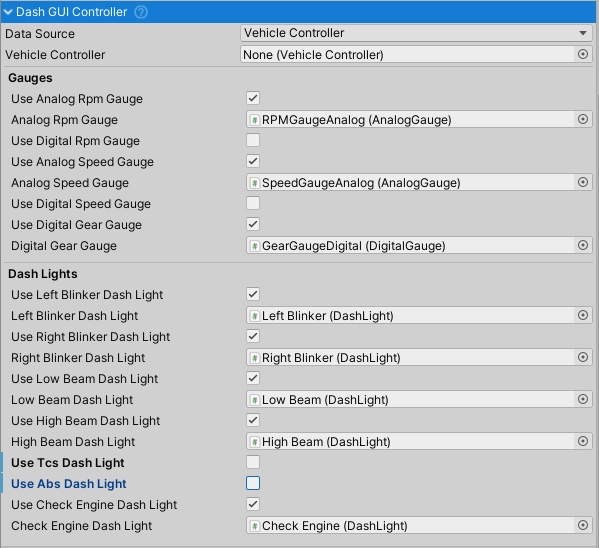
Central controller for vehicle dashboard UI. Manages and updates gauges and indicator lights by reading data from VehicleController.
Requires a Canvas component. Automatically enables/disables the canvas when the vehicle is enabled/disabled.
Data Source
- Vehicle Controller - Reads from the assigned
vehicleControllerfield. Use for single-vehicle setups or dedicated in-vehicle dashboards. - Vehicle Changer - Automatically tracks the active vehicle from VehicleChanger. Use for multi-vehicle scenarios with vehicle switching. Requires one VehicleChanger in the scene.
Gauges
Supports Analog Gauge, Digital Gauge, and Dash Light components.
Available Gauges
- Analog RPM Gauge - Tachometer with rotating needle
- Digital RPM Gauge - Numeric RPM display
- Analog Speed Gauge - Speedometer with rotating needle (displayed in km/h)
- Digital Speed Gauge - Numeric speed display (displayed in km/h)
- Digital Gear Gauge - Shows current gear name (R, N, 1, 2, 3, etc.)
Each gauge has a corresponding use flag to enable/disable updates.
Dash Lights
Indicator lights for vehicle systems and controls:
- ABS - Illuminates when ABS is actively preventing wheel lock-up
- TCS - Illuminates when traction control is actively limiting wheel spin
- Check Engine - Illuminates when engine damage exceeds 99.99%
- Left Blinker - Blinks with left turn signal
- Right Blinker - Blinks with right turn signal
- Low Beam - Illuminates when low beam headlights are active
- High Beam - Illuminates when high beam headlights are active
Each light has a corresponding use flag to enable/disable updates.