Analog Gauge
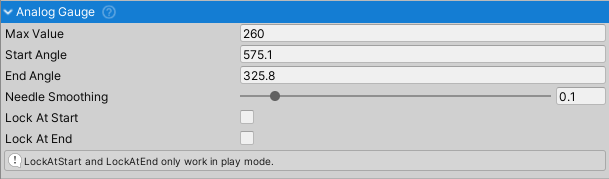

Universal analog gauge that rotates a needle GameObject to display values for speedometers, tachometers, or custom dashboards.
Setup
Requires a child GameObject named "Needle" to function. A pre-configured prefab is included with the asset.
Properties
- Max Value: Maximum value displayed by the gauge. Values are clamped between 0 and this limit.
- Start Angle: Needle rotation (degrees, Z-axis) at minimum value (0). Use
Lock At Startin play mode to calibrate. - End Angle: Needle rotation (degrees, Z-axis) at maximum value. Use
Lock At Endin play mode to calibrate. - Needle Smoothing (0-1): Simulates physical needle inertia. 0 = instant response, 1 = maximum damping. Recommended: 0.3-0.7.
- Lock At Start: Locks needle at start angle for calibration (play mode only).
- Lock At End: Locks needle at end angle for calibration (play mode only).
Usage
Set the gauge value via code:
AnalogGauge gauge = GetComponent<AnalogGauge>();
gauge.Value = currentSpeed; // Automatically clamped to [0, maxValue]