Water Object Manager
Note:
WaterObjectManagerhas been removed in v2.5. This page exists for backwards compatibility purposes.
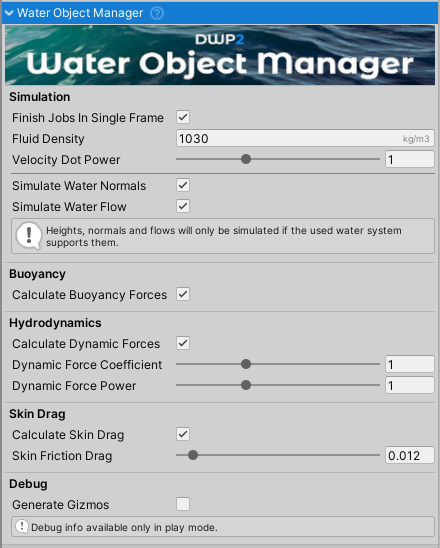
WaterObjectManager is the main script of Dynamic Water Physics 2 and must be present in the scene for water/object interaction to work. It does not matter to which object it is attached, it just needs to be present in the scene.
WaterObjectManager fetches the data from all the WaterObjects in the scene, processes it, and sends it to a job which performs physics calculations using multiple CPU cores.
Fields
Simulation Settings
Finish Jobs In Single Frame- If enabled, jobs will be finished on the same frame they started. Disabling improves performance but adds a one-frame delay to water/object interaction. This delay is negligible in most cases. Default is disabled.Fluid Density- Density of the simulated fluid in kg/m³. Default is 1030 (salt water).Velocity Dot Power- Controls the velocity/force relationship. A value of 1 should be used for normal water. Values below 1 reduce force response, values above 1 increase it.
Force Calculation
Calculate Buoyancy Forces- When enabled, buoyancy forces will be calculated.Calculate Dynamic Forces- When enabled, hydrodynamic forces will be approximated. Disable to use only buoyancy.Dynamic Force Coefficient- Multiplier for the calculated hydrodynamic forces.Dynamic Force Power- Exponent applied to the calculated hydrodynamic force.Calculate Skin Drag- When enabled, friction drag is calculated from fluid passing over surfaces.Skin Friction Drag- Skin friction coefficient. Use 0 or near 0 for water; higher values for viscous fluids.
Water Interaction
Simulate Water Normals- When enabled, water surface normals are used when calculating forces. Has no effect if the water system does not support normals.Simulate Water Flow- When enabled, water flow is used when calculating forces. Has no effect if the water system does not support flow.
Debugging
Generate Gizmos- When enabled, gizmos are generated from simulation data for visualization in the scene view.
Instantiating WaterObjects at Runtime
Warning: When a
WaterObjectis added to the scene during play mode, it will not be automatically registered. This requires re-allocating memory for jobs, which is expensive and should ideally be done during loading screens.
There are two approaches for adding objects to the scene during runtime:
Method 1: Immediate Synchronization
Use this method when instantiating a low number of triangles:
- Instantiate the object
- Immediately call
WaterObjectManager.Instance.Synchronize()
This ensures the object is immediately registered and simulated.
Method 2: Pre-instantiate and Deactivate
Use this method when you need to add many objects:
- Instantiate all objects during scene load
- Keep them deactivated
WaterObjectManagerwill allocate memory for inactive objects without simulating them- When needed, simply activate the object (no need to call
Synchronize())
See Also
- WaterObject - Individual water physics component for each object
- WaterAssets - Supported water systems for interaction
- Quick Start - Getting started with water physics simulation