Damage Handler
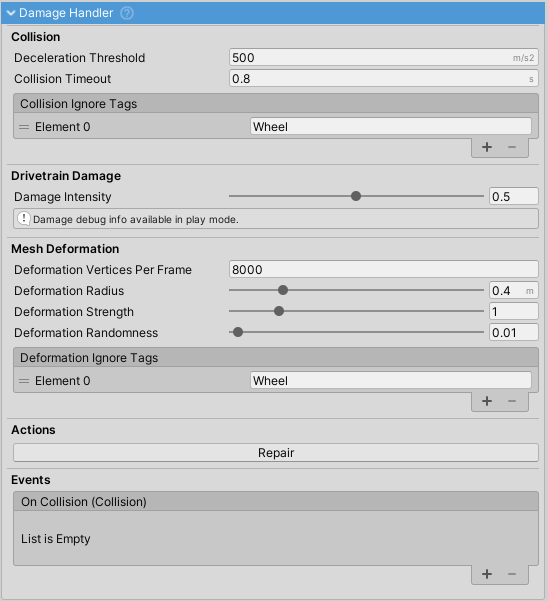
Handles vehicle collision damage detection, mesh deformation, and performance degradation based on impact forces.
Key Features
- Mesh Deformation: Real-time vertex deformation on collision (requires meshes with Read/Write enabled)
- Performance Degradation: Reduces engine power, transmission efficiency, and wheel handling based on collision proximity
- Queue-Based Processing: Deforms limited vertices per frame to prevent frame drops
- Damage Accumulation: Cumulative damage value (0-1) affects vehicle performance over time
Configuration
Collision Detection
| Property | Description |
|---|---|
Deceleration Threshold |
Minimum deceleration (m/s²) to trigger damage |
Collision Timeout |
Prevents duplicate damage from single impacts |
Collision Ignore Tags |
Tags to exclude from damage processing (default: "Wheel") |
Damage
| Property | Description |
|---|---|
Damage Intensity |
Multiplier for how much collisions add to damage value |
Visual Only |
When enabled, damage only affects meshes without performance impact |
Damage |
Current accumulated damage (0-1, runtime only) |
Mesh Deformation
| Property | Description |
|---|---|
Mesh Deform |
Enable/disable mesh deformation |
Deformation Vertices Per Frame |
Number of vertices processed per frame (balance between performance and deformation speed) |
Deformation Radius |
Distance within which vertices are deformed |
Deformation Strength |
How much vertices move for given collision strength |
Falloff Type |
Deformation curve shape: Linear (uniform), Smoothstep (sharp edges, soft center), Exponential (very sharp edges) |
Noise Scale |
Perlin noise detail level (1-50). Higher values produce finer variation in deformation |
Noise Strength |
How much noise affects deformation (0-1). 0 = smooth, 1 = maximum variation |
Deformation Randomness |
Adds additional random noise to deformation (0 = smooth, higher = rough/noisy) |
Multi Contact Processing |
When enabled, processes each contact point individually for shape-aware deformation matching the impact area |
Surface Conformance |
Blend between impact velocity and contact normal (0 = velocity only, 1 = normal only) |
Surface Angle Threshold |
Minimum dot product for vertex deformation (-1 = any direction, 0 = direct facing only) |
Max Deformation Ratio |
Maximum deformation distance as ratio of radius to prevent extreme distortion |
Deformation Ignore Tags |
Tags to exclude from mesh deformation |
Requirements
- Meshes must have Read/Write enabled in import settings for deformation to work
- Skinned meshes are not supported
Methods
- Repair(): Resets all damage and restores meshes to original state
Related: