Wheel Group
Represents a group of wheels that share common properties. Typically used for axles, connecting wheels to differentials and applying brake distribution, steering coefficients, and geometry settings.
Steering
| Property | Description |
|---|---|
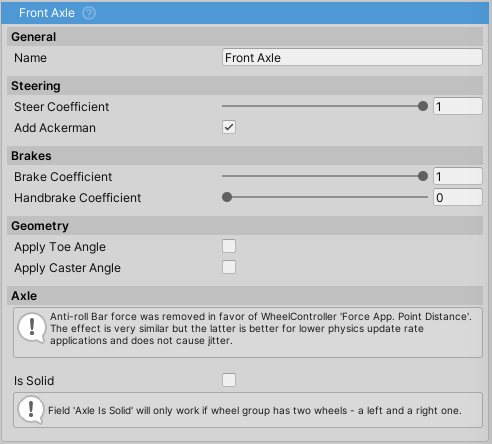
Steer Coefficient |
Percentage of steering input applied to this group. Range: -1 to 1. Values: 1 = full steering, 0 = no steering, -0.5 = 50% counter-steering (e.g., rear-wheel steering) |
Add Ackerman |
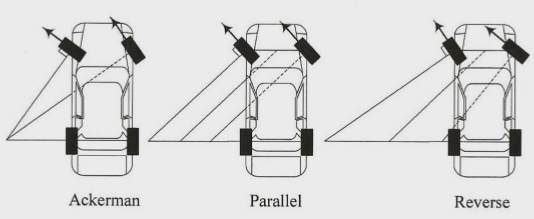
Applies Ackerman steering geometry to reduce tire scrub during turns. The angle is automatically calculated based on wheelbase and track width. See Wikipedia for details |
Brakes
| Property | Description |
|---|---|
Brake Coefficient |
Brake torque distribution as percentage of Brakes => Max Torque. Range: 0-1 |
Handbrake Coefficient |
Handbrake torque distribution. Range: 0-2 (values >1 apply more force than regular braking) |
Geometry
| Property | Description |
|---|---|
Apply Toe Angle |
Enable to apply toe angle setting to wheels in this group |
Toe Angle |
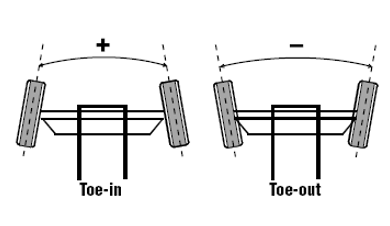
Angle in degrees. Positive = toe-in (inward), negative = toe-out (outward). Range: -8 to 8 degrees |
Apply Caster Angle |
Enable to apply caster angle setting to wheels in this group |
Caster Angle |
Angle in degrees. Positive angles the steering axis toward the front (improves stability), negative angles backward. Range: -8 to 8 degrees |
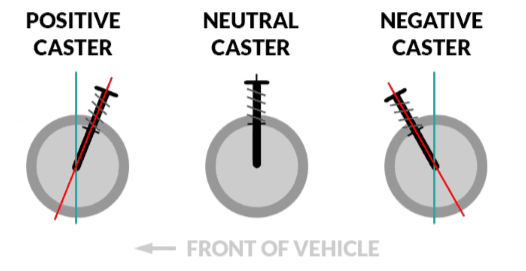
Note: Camber is set directly on the WheelController, not through WheelGroup (except for solid axles where it's auto-calculated). For dynamic camber, enable useCamberCurve on the WheelController.
Axle
Note: Axle settings only apply when exactly two wheels are in the group.
| Property | Description |
|---|---|
Is Solid |
Simulates a rigid axle connection. Automatically calculates camber based on suspension travel difference between left and right wheels, keeping them parallel |
Track Width |
Distance between left and right wheels (automatically calculated) |
Anti-Roll Bar (ARB)
ARB is now configured on individual WheelController components, not on WheelGroup.
Set ARB Stiffness and ARB Damping on each wheel's WheelController for proper substepped physics integration:
| Property | Description |
|---|---|
ARB Stiffness |
Torsional stiffness in Nm/rad. Road cars: 500-5000 Nm/rad, Race cars: 10000+ Nm/rad, Off-road: 0-1000 Nm/rad |
ARB Damping |
Damping in Nm·s/rad. Typically 5-20% of stiffness |
ARB was previously configured on WheelGroup. It is now configured per-wheel on WheelController for proper substepped physics integration.