TCS Module
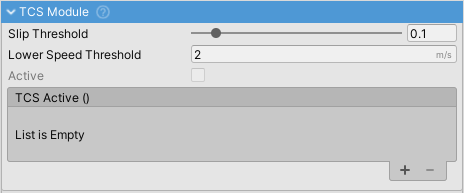
Traction Control System (TCS) prevents wheel spin during acceleration by applying counter-torque when longitudinal slip exceeds a threshold. Helps keep traction on slippery surfaces.
How It Works
TCS monitors driven wheels for excessive slip during acceleration. When slip exceeds the threshold, the system applies counter-torque at the friction level to reduce wheel spin. Only powered wheels are monitored (FWD, RWD, or AWD configurations).
Settings
| Property | Range | Description |
|---|---|---|
| Slip Threshold | 0-1 | Longitudinal slip value at which TCS activates at high speeds. Default: 0.1 |
| Low Speed Slip Threshold | 0-1 | More permissive slip threshold at low speeds to prevent false triggers during turns. Default: 0.25 |
| Lower Speed Threshold | m/s | Minimum speed for TCS activation. Below this, TCS is disabled. Default: 2.0 |
| Upper Speed Threshold | m/s | Speed at which TCS reaches full intensity. Threshold interpolates from low to high between lower and upper speeds. Default: 10.0 |
| Active | - | Read-only indicator showing if TCS is currently limiting power |
Typical Values
Comfort/Safety (maximum traction):
slipThreshold: 0.06
lowSpeedSlipThreshold: 0.20
lowerSpeedThreshold: 1.5
upperSpeedThreshold: 8.0
Sport (balanced):
slipThreshold: 0.12
lowSpeedSlipThreshold: 0.25
lowerSpeedThreshold: 2.0
upperSpeedThreshold: 10.0
Performance (allows wheel spin):
slipThreshold: 0.20
lowSpeedSlipThreshold: 0.35
lowerSpeedThreshold: 3.0
upperSpeedThreshold: 12.0
Behavior Notes
- Only monitors powered wheels (those receiving motor torque) with per-wheel control at the friction level
- Slip threshold automatically interpolates from
lowSpeedSlipThresholdtoslipThresholdas speed increases fromlowerSpeedThresholdtoupperSpeedThreshold - Higher threshold at low speeds prevents false triggers from differential behavior during turns
- Ignores slip during gear changes to prevent false triggers
- TCS slip threshold should typically be lower than ABS threshold since acceleration slip peaks at lower values
- Works independently of ABS and ESC modules
Events
- onTCSActive - Unity event triggered each physics frame while TCS is active. Use for dashboard lights, engine sound changes, or telemetry.
Scripting
TCSModule tcs = vehicleController.GetComponent<TCSModuleWrapper>().module;

// Check if TCS is currently intervening
bool isTcsIntervening = tcs.active;

// Check if the TCS module itself is enabled
bool isModuleEnabled = tcs.IsActive;

// Adjust thresholds at runtime
tcs.slipThreshold = 0.08f;
tcs.lowSpeedSlipThreshold = 0.20f;

// Change speed range for interpolation
tcs.lowerSpeedThreshold = 1.5f;
tcs.upperSpeedThreshold = 8.0f;

// Disable TCS for drift mode
tcs.VC_Disable(false);
Related
- ABS Module - Anti-lock Braking System
- ESC Module - Electronic Stability Control
- Engine Component - Engine configuration
- Module Manager - Module system overview