Input System Provider
- Ships retrieve user input through
Inputclass which retrieves input from activeInputProviderand fills theInputStatesstruct with the retrieved data.- Multiple different
InputProviders can be present in the scene (v1.0 or newer required). E.g. InputSystemProvider and MobileInputProvider can be used in the same scene. The resulting input will be a sum of inputs from allInputProviders in case of numeric inputs and logical OR operation of all inputs in case of boolean inputs.
- Multiple different
- Input is stored inside
InputStatesobject and can be copied over from one ship to another. - To manually set the
InputStatesmake sureAuto Settableis set to false.
All input providers inherit from abstract class InputProvider but have
different implementations:
- InputManagerProvider - for handling keyboard and mouse or gamepad input through InputManager.
- InputSystemProvider - same as InputManagerProvider but for new Unity Input System.
- MobileInputProvider - GUI based input.
Check the Scripting section below on how to make a custom
InputProvider or set up AI.
Input System Warning
When importing the asset for the first time this message will pop up:
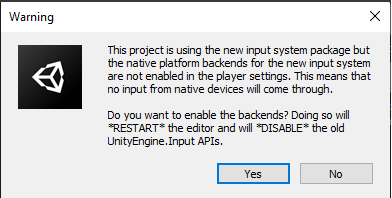 Select Yes to enable the new InputSystem.
The demo scenes rely on InputSystem.
Select Yes to enable the new InputSystem.
The demo scenes rely on InputSystem.
Available Bindings
Warning: Out of the box gamepad bindings are only available for InputSystem.
| Name | Type | Keyboard Defaults | Gamepad Defaults | Description |
|---|---|---|---|---|
| Ship Bindings | ||||
Steering |
axis [-1,1] | A/D | Left Stick - Left/Right | Steering. |
Throttle |
axis [-1,1] | W/S | Left Stick - Up/Down, Left/Right Trigger | Throttle. |
BowThruster |
axis [-1,1] | Q/E | Bow thruster. | |
SternThruster |
axis [-1,1] | Z/C | Stern thruster. | |
SubmarineDepth |
axis [-1,1] | K/I | Submarine depth. | |
EngineStartStop |
button | E | Square (PS) / X (Xbox) | Start or stop the engine. |
Anchor |
button | T | Triangle (PS) / Y (Xbox) | Drop or weight the anchor. |
| Camera Bindings | ||||
ChangeCamera |
button | C | Start | Changes camera. |
CameraRotation |
2D axis | Mouse Delta | Right Stick | Controls camera rotation. |
CameraRotationModifier |
button | Mouse - LMB | Right Stick Press | Enables camera rotation. |
CameraZoom |
axis | Mouse - Scroll | D-Pad Up/Down | Camera zoom in/out. |
| Scene Bindings | ||||
ChangeShip |
button | V | Select | Change ship. |
ToggleGUI |
button | Tab | Toggles demo scene GUI. |
Input Manager (old/classic)
Input System (new)
Mobile Input Provider
- Add
MobileInputProviderto the scene. - Create a few UI => Button objects inside your canvas. Make sure that they are clickable.
- Remove the
UnityEngine.UI.Buttoncomponent and replace it withMobileInputButton.MobileInputButtoninherits fromUnityEngine.UI.Buttonand addshasBeenClickedandisPressedfields which are required forMobile Input Provider - Drag the buttons to the corresponding fields in the
MobileInputProvider. Empty fields will be ignored.
Scripting
Retrieving Input
Multiple InputProviders can be present in the scene, meaning that
their input has to be combined to get the final input result. To get the
combined input use:
float throttle = InputProvider.CombinedInput(i => i.Throttle());
bool engineStartStop = InputProvider.CombinedInput(i => i.EngineStartStop());
Or to get the input from individual InputProviders (say to find out
if a button was pressed on a keyboard):
float throttle = InputProvider.Instances[0].Throttle;
When using input generated by code (i.e. AI) it is usually handy to have access to a single axis throttle/brake. This can be done like so:
shipController.input.Throttle = 0.5f;
Warning:
shipController.input.states.throttleis equal toshipController.input.Throttle. The latter is just a getter/setter for convenience.
Manually Setting Input
Input in each ship is stored in InputStates struct:
myShipController.input.states
In case input should not be retrieved from user but from another
script - as is the case when AI is used - AutoSettable should be set
to false. This will disable automatic input fetching from the active
InputProvider.
Input now can be set from any script:
myShipController.input.Horizontal = myFloatValue; // Using getter/setter.

myShipController.input.states.horizontal = myFloatValue; // Directly accessing states.
Custom InputProvider
If a custom InputProvider is needed it can easily be written. Custom
InputProviders allow for new input methods or for modifying the
existing ones. E.g. if the MobileInputProvider does not fit the needs
of the project a copy of it can be made and modifications done on that
copy. That way it will not get overwritten when the asset is updated.
Steps to create a new InputProvider:
- Create a new class, e.g.
ExampleInputProviderand make it inherit fromInputProviderclass:
public class ExampleInputProvider : InputProvider {}
- Overwrite required methods.