Vehicle Setup Wizard
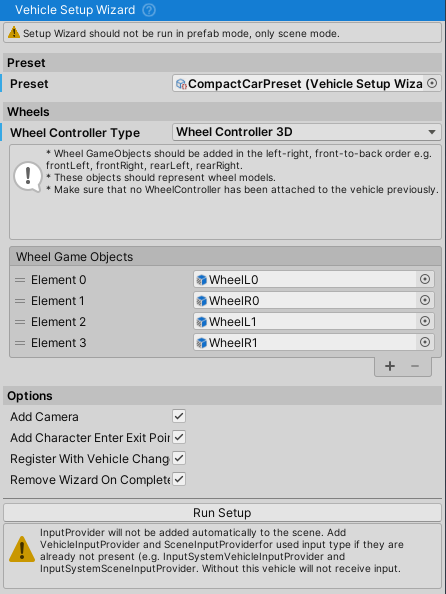
Vehicle Setup Wizard is a script that automates a part of vehicle setup process. It sets up the Rigidbody, VehicleController, wheels and powertrain, and can add a camera and character enter/exit points. Not everything is set up automatically and this script should be considered as a first step in a vehicle setup process.
Prepare the model
Use a model with separate wheel objects, a correctly oriented root and a scale of [1,1,1]. Add at least one collider that roughly covers the body. The Quick Start guide explains model preparation and the scene's physics settings.
In v14 the wizard can work on a scene object or a vehicle opened in Prefab Mode. Start with the wheel models before adding WheelController components; the wizard creates those components itself.
Create the custom Vehicle and Wheel tags under Edit > Project Settings > Tags and Layers. Also create EnterExitPoint if you plan to enable Add Character Enter Exit Points. Unity rejects an undefined tag, which prevents setup from completing.
Run the wizard
- Attach
VehicleSetupWizardto the vehicle root, where its Rigidbody belongs. - Enter the vehicle's width, height and length in metres.
- Assign a
VehicleSetupWizardPreset. Choose one close to the vehicle you are building. The available vehicle types cover cars, sports cars, off-road vehicles, monster trucks, semi trucks, trailers and motorcycles. - Add wheel models to Wheel GameObjects in left/right pairs, from front to back: front-left, front-right, rear-left, rear-right. For a motorcycle, use front then rear.
- Choose whether to add a camera and character enter/exit points. Enable Remove Wizard On Complete if the component should remove itself after setup.
- Click Run Setup, then read the Console for errors or warnings.
The wizard creates the core components, then applies the preset's mass, inertia, powertrain and suspension settings. Wheel radius and width are estimated from the meshes, with wheel mass sized from those dimensions. Check the resulting wheel gizmos against the model; an unusual mesh can give a poor estimate.
The newly created wheels use automatic load-rating calculation. Check the vehicle's mass and weight distribution before tuning tire response. Wheel models are moved into the WheelControllers' rotating containers, so inspect the resulting hierarchy before adding more visual parts.
Check the vehicle
Add an input provider to the scene if one is not already present. The wizard does not create input providers in v14. Add a scene provider as well if the camera and vehicle-changing controls are needed.
Press Play and check that the vehicle steers, brakes and drives in both directions. The preset gives it an initial setup; adjust it for the model's actual mass, engine, gearing and suspension. Cars use rear-wheel drive by default, with the drivetrain configurable through the preset. Continue with the Vehicle Controller manual for detailed tuning.
To create a reusable setup for similar vehicles, use Assets > Create > NWH > Vehicle Physics 2 > Vehicle Setup Wizard Preset. Set up your own preset so changes to package examples do not overwrite your vehicle settings.
Calling the wizard from a script
For a tool that prepares many models, call RunSetup() to create the components and RunConfiguration() to apply a preset. The following is a complete component example. Its wheel list, model and preset need to be assigned before calling Configure(). A custom assembly definition containing it must reference NWH.VehiclePhysics2.SetupWizard in addition to the core assembly.
using System.Collections.Generic;
using NWH.VehiclePhysics2;
using NWH.VehiclePhysics2.SetupWizard;
using UnityEngine;

public sealed class ConfigureVehicleWithWizard : MonoBehaviour
{
    [SerializeField] private GameObject vehicleRoot;
    [SerializeField] private List<GameObject> wheelGameObjects = new List<GameObject>();
    [SerializeField] private VehicleSetupWizardPreset preset;

    public void Configure()
    {
        VehicleController vehicle = VehicleSetupWizard.RunSetup(
            vehicleRoot,
            wheelGameObjects,
            addCamera: true,
            addCharacterEnterExitPoints: true,
            width: 1.8f,
            height: 1.5f,
            length: 4.5f);

        if (vehicle != null && preset != null)
        {
            VehicleSetupWizard.RunConfiguration(vehicle, preset);
        }
    }
}