Vehicle Changer
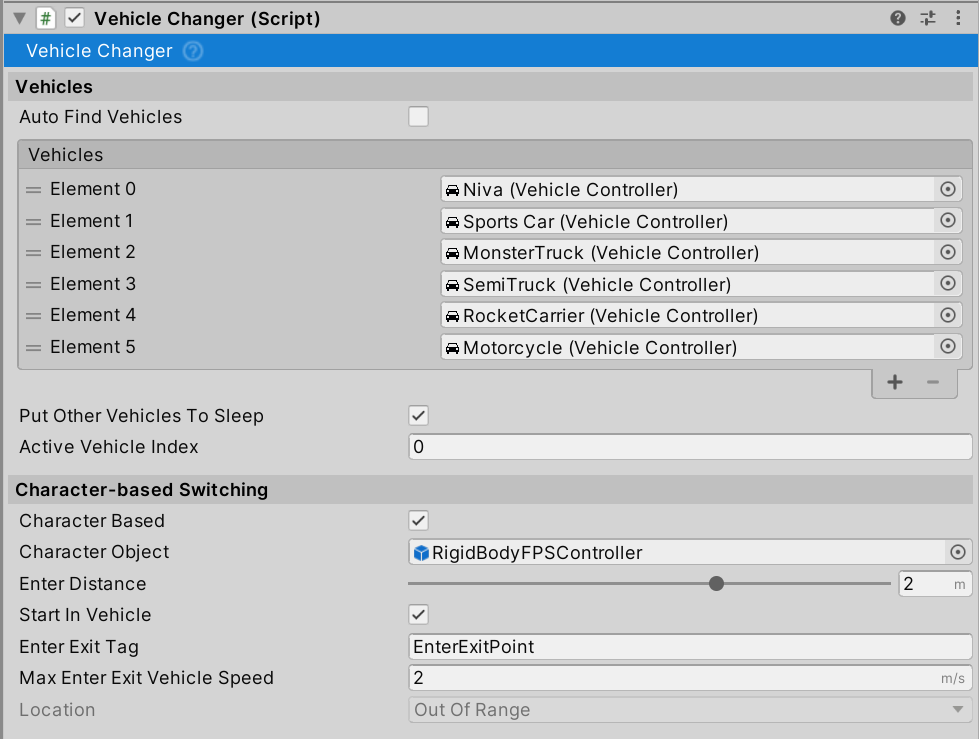
Manages switching between multiple vehicles with support for instant switching or character-based enter/exit mode.
Setup
Add vehicles to the Vehicles list. Vehicles can also register themselves via RegisterVehicle() and DeregisterVehicle() methods.
Instant Switching
Press ChangeVehicle (Input Setup) to cycle through vehicles. Use NextVehicle() or PreviousVehicle() methods for manual control.
Character-based Switching
Enable Character Based to require walking to vehicles and entering/exiting at designated points.
Settings:
Character Object: GameObject deactivated when inside vehiclesEnter Distance: Range to enter vehicle (0.2-3m, default 2m)Enter Exit Tag: Tag for entry point GameObjects (default:EnterExitPoint)Max Enter Exit Vehicle Speed: Maximum vehicle speed to allow entry/exit (default 2 m/s)Start In Vehicle: Begin inside the active vehicle
Entry Points: Add empty child GameObjects to vehicles with the EnterExitPoint tag (or custom tag). Character spawns at the entry point position when exiting.
Performance
Put Other Vehicles To Sleep: Disables inactive vehicles to improve performance when managing many vehicles.
Events
onVehicleChanged: Invoked when active vehicle changesonDeactivateAll: Invoked when all vehicles are deactivated (character mode exit)
Scripting
Access via singleton: VehicleChanger.Instance
Methods: ChangeVehicle(int), ChangeVehicle(Vehicle), EnterVehicle(Vehicle), ExitVehicle(Vehicle), RegisterVehicle(Vehicle), DeregisterVehicle(Vehicle)