Variable Center of Mass
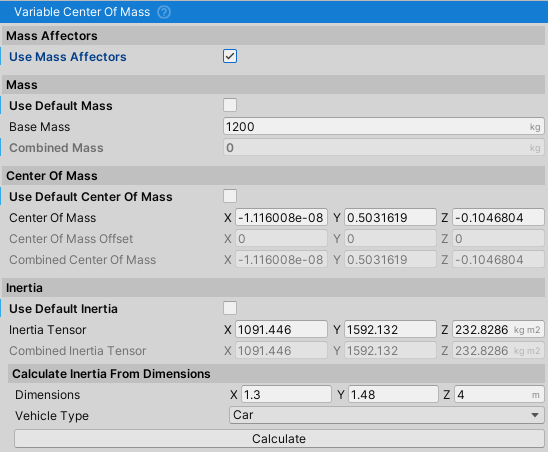
Note: VariableCenterOfMass is part of NWH Common. For full documentation including examples, integration with NWH assets, and best practices, see NWH Common - Variable Center of Mass.
Note: Shared script across NWH vehicle assets.
Important: In Unity 6, center of mass and inertia can be adjusted directly in Rigidbody inspector.
Dynamically updates Rigidbody mass, center of mass, and inertia tensor based on MassAffector components. Handles weight shifts from fuel consumption, cargo loading, and passenger weight.
Usage
- Attach
MassAffector(or anyIMassAffectorimplementation) as a child of the vehicle. - Enable
Use Mass AffectorsonVariableCenterOfMass. - Disable
Use Default...checkboxes for properties that should be affected by mass affectors. - Call
MarkDirty()when mass affectors change to trigger recalculation.
Key Properties
- baseMass: Base mass without affectors (kg)
- centerOfMass: Base center of mass offset
- inertiaTensor: Base inertia tensor (kg⋅m²)
- dimensions: Object dimensions for inertia calculation (width, height, length in meters)
- useMassAffectors: Enable dynamic mass affector contribution
- useDefaultMass/CenterOfMass/Inertia: Use Rigidbody defaults instead of custom values
- isDirty: Flags properties for recalculation in next FixedUpdate
Public Methods
- MarkDirty(): Marks properties for recalculation (call when mass affectors change)
- UpdateAllProperties(): Recalculates all Rigidbody properties immediately
- GetWorldCenterOfMass(): Returns combined center of mass in world space
- CalculateInertia(dimensions, mass): Static helper to calculate inertia tensor for cuboid
Scene Gizmos
- Yellow sphere: Current center of mass
- Cyan spheres: Mass affector positions
- RGB lines: Object dimensions (when custom inertia enabled)