Transmission Component
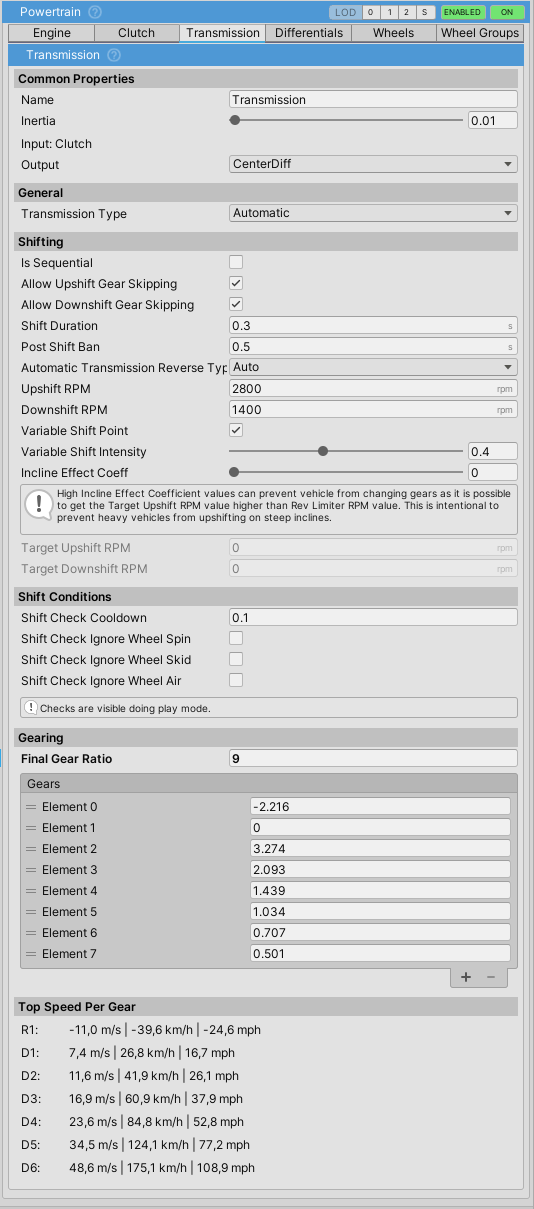
Mandatory powertrain component that handles gear ratios, shifting logic, and power transmission from engine to differential/wheels. Always third in the Powertrain.Components list.
Gearing
- Gearing is assigned through the
gearslist ordered from reverse (negative), neutral (0), then forward gears (positive). - Example:
{-2.216, 0, 3.274, 2.093, 1.439, 1.084, 0.817, 0.651}= 1 reverse + neutral + 6 forward gears finalGearRatiomultiplies each gear ratio, equivalent to axle/differential ratio (typically 3-6 for cars, higher for trucks).- Gear ratios can be adjusted at runtime.
Transmission Types
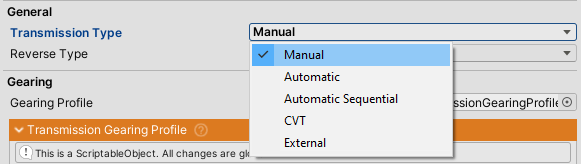
Manual
Gears can only be changed through user input. Check Input Setup for input bindings.
Additional Settings:
holdToKeepInGear- If enabled, gear input must be held continuously (for hardware H-shifters). Releasing input returns to neutral.ignorePostShiftBanInManual- When enabled (default), manual shifts are instant without post-shift ban delay.
Automatic
Vehicle shifts automatically based on:
Upshift RPM/Downshift RPM- Base shift pointsVariable Shift Point- When enabled, adjusts shift points based on throttle position and inclineVariable Shift Intensity- How much throttle affects shift points (0-1)Incline Effect Coeff- Delays upshifts on steep inclines to prevent lugging
Shift Behavior:
isSequential- Only allows shifting one gear at a time (e.g., 3rd to 4th only)allowUpshiftGearSkipping- Allows skipping gears during upshift (e.g., 2nd to 4th) when not sequentialallowDownshiftGearSkipping- Allows skipping gears during downshift (e.g., 5th to 2nd) when not sequential
D/N/R Shifting:
automaticTransmissionDNRShiftType:Auto- Automatically shifts to Drive on throttle, Reverse on brakeRequireShiftInput- Requires explicit shift input to change D/N/RRepeatInput- Input must be released then re-applied to shift
dnrSpeedThreshold- Maximum speed for D/N/R transitions (default 0.4 m/s)
CVT
Continuously Variable Transmission provides smooth, stepless ratio changes. Maintains engine RPM at an optimal point based on throttle and vehicle speed. No discrete gear shifts, only D/N/R transitions.
Gears List Format:
Requires minimum 4 entries:
{ -2.5, 0, 2.5, 0.5 }
   │    │   │    └── Min ratio (overdrive) - high speed cruising
   │    │   └─────── Max ratio (low gear) - launch/acceleration
   │    └─────────── Neutral
   └───────────────── Reverse
CVT Settings:
cvtTargetRPMPercent(0.3 - 0.9) - Target engine RPM as percentage between idle and rev limiter. Lower = efficiency, higher = performance.cvtResponseRate(1 - 20) - How quickly ratio adjusts. Higher = faster response.automaticTransmissionDNRShiftType- Same as Automatic transmission (see above)dnrSpeedThreshold- Same as Automatic transmission (see above)
CVT Behavior:
| Condition | Behavior |
|---|---|
| Standstill + throttle | Max ratio (high torque) for launch |
| Accelerating | Ratio decreases to maintain target RPM |
| Cruising | Ratio approaches min (overdrive) for efficiency |
| High throttle | Target RPM increases, ratio adjusts accordingly |
| Coasting (throttle off) | Ratio holds for consistent engine braking |
| Stopping | Shifts to neutral below speed threshold |
External
Custom shifting logic via delegate assignment. Assign shiftDelegate to implement your own shift pattern. If delegate is not assigned, no gear shifts will occur.
Timing
shiftDuration- Time to change gears. Engine throttle is cut during shift. Applies to all transmission types.postShiftBan- Minimum time between shifts. Prevents gear hunting. Only affects automatic transmissions (ignored in manual whenignorePostShiftBanInManualis enabled).shiftInAir- Whether transmission can shift when all wheels are off the ground.shiftProgress- Read-only (0-1) showing current shift progress during gear change.
Additional Features
Clutch Integration:
clutchInputShiftThreshold- If >0, clutch must be released below this value for shifts to occur.triedToShiftWithoutClutch- UnityEvent triggered when player attempts to shift without clutch pressed.
Events:
onShift- Triggered on any gear change (up or down)onUpshift- Triggered when shifting to higher gearonDownshift- Triggered when shifting to lower gear
Properties:
Gear- Current gear number (-1 = R, 0 = N, 1+ = forward gears)GearName- Formatted gear name as string (e.g., "R1", "R2", "N", "1")currentGearRatio- Current total gear ratio (gear × finalGearRatio)ShiftInto(int gear)- Method to shift into specific gear programmatically