Surface Preset
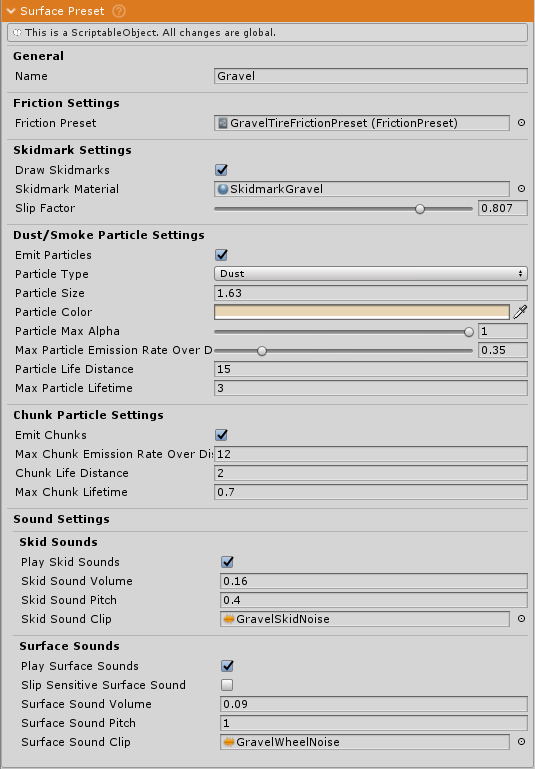
A ScriptableObject that defines all properties for a specific surface type including friction characteristics, visual effects (particles, skidmarks), and audio properties. Each preset represents a unique material type that wheels can interact with (asphalt, gravel, sand, grass, ice, etc.).
Surface presets are referenced by SurfaceMaps and applied to wheels when the corresponding terrain texture or object tag is detected.
Create via: Project window > Right-click > Create > NWH > Vehicle Physics 2 > Surface Preset
Friction Settings
Friction Preset
Assigns a FrictionPreset that defines grip characteristics (forward/lateral friction curves). Has the largest effect on vehicle handling, determining acceleration, braking, and cornering performance.
Rolling Resistance Max Multiplier
Multiplies wheel rolling resistance based on tire load (range: 1-50). Simulates surfaces where wheels sink or deform the ground:
- 1.0: Normal resistance (asphalt, concrete)
- 2-5: Soft surfaces (grass, dirt) - moderate drag
- 10-20: Very soft surfaces (deep sand, mud) - significant drag
- 20-50: Extremely soft surfaces (deep snow, swamp) - very high drag
Affects acceleration, top speed, and fuel consumption. Higher values make it harder for vehicles to move.
Skidmark Settings
Draw Skidmarks
Enable to render tire marks on this surface. Disable for surfaces where marks wouldn't be visible (water, loose sand).
Skidmark Material
Material applied to skidmark geometry. Should visually match tire marks for this surface (black streaks for asphalt, brown tracks for dirt).
Required whenever Draw Skidmarks is on. If it is left empty the skidmark object keeps the material it was last pooled with, so marks show up in the wrong surface's colour.
Slip Factor
Controls how wheel slip affects skidmark intensity and particle emission (range: 0-1):
- 0.0-0.3: Low slip sensitivity
- 0.3-0.6: Moderate (default: 0.5)
- 0.6-1.0: High slip sensitivity
Skidmark Base Intensity
Base intensity when there's no wheel slip (range: 0-1):
- 0: Hard surfaces - marks only appear when skidding (asphalt, concrete)
- 0.1-0.3: Firm surfaces with faint tracks (packed dirt)
- 0.4-0.7: Soft surfaces with clear impressions (mud, wet sand)
- 0.8-1.0: Very soft surfaces with deep tracks (fresh snow)
Particle Settings
Dust/Smoke Particles
Emit Particles: Enable particle emission for this surface.
Particle Type:
- Smoke: Emits based on wheel slip. For hard surfaces (asphalt, concrete). Only appears during skidding/burnouts.
- Dust: Emits based on wheel speed. For loose surfaces (dirt, gravel, sand). Continuous emission when moving.
Particle Size: Initial size multiplier (typical: 0.5-5.0, default: 1.0).
Particle Color: Base color for emitted particles. Should match natural dust/smoke color for the surface.
Particle Max Alpha: Maximum opacity when first emitted (range: 0-1, default: 0.8).
Max Particle Emission Rate Over Distance: Particles emitted per meter traveled (range: 0-2, default: 0.36). Higher values create denser effects.
Particle Life Distance: Maximum distance particles can travel from vehicle before being destroyed (default: 10m).
Max Particle Lifetime: Maximum lifetime in seconds (default: 3.5s). Longer values create lingering effects. Set to 0 for no cap, in which case lifetime is decided by Particle Life Distance and vehicle speed alone - a slow-moving vehicle on a dusty surface can then leave dust hanging for a long time.
Chunk Particles
Emit Chunks: Enable dirt/debris/stone chunks thrown behind wheels. Suitable for loose surfaces like gravel, dirt, or sand.
Max Chunk Emission Rate Over Distance: Chunks emitted per meter (typical: 0.5-5.0, default: 1.0).
Chunk Life Distance: Maximum distance chunks can travel from wheel (default: 3m).
Max Chunk Lifetime: Maximum lifetime in seconds (default: 0.5s).
Sound Settings
Skid Sounds
Play Skid Sounds: Enable skidding sound effects when wheels slip.
Skid Sound Clip: Audio clip for skidding sound (high-pitched squeal for asphalt, grinding for gravel).
Skid Sound Volume: Volume multiplier (default: 0.3). Hard surfaces typically louder (0.4-0.7), soft surfaces quieter (0.1-0.3).
Skid Sound Pitch: Pitch multiplier (default: 1.0). Higher values create higher-pitched sounds.
Surface Sounds
Play Surface Sounds: Enable rolling sound effects when tires move over this surface.
Slip Sensitive Surface Sound: When enabled, volume varies with wheel slip. Use for hard surfaces where tire noise increases with slipping (asphalt, concrete). Disable for soft surfaces with consistent rolling sounds (dirt, grass, sand).
Surface Sound Clip: Audio clip for rolling sound (smooth hum for asphalt, crunching for gravel).
Surface Sound Volume: Volume multiplier (default: 0.3). Rough surfaces typically louder, smooth surfaces quieter.
Surface Sound Pitch: Pitch multiplier (default: 1.0).
Common Surface Type Examples
Asphalt: High friction preset, smoke particles, dark skidmarks (slip factor ~0.5), slip-sensitive sound, rolling resistance 1.0
Gravel: Medium friction preset, dust particles, light skidmarks (slip factor ~0.3), constant sound, rolling resistance 2-3, emit chunks
Sand: Low friction preset, dust particles, deep tracks (base intensity 0.7+), constant sound, rolling resistance 10-20, emit chunks
Grass: Medium friction preset, minimal particles, faint tracks, medium rolling resistance 3-5
Ice: Very low friction preset, no particles, minimal skidmarks, slip-sensitive sound, rolling resistance 1.0