Surface Map
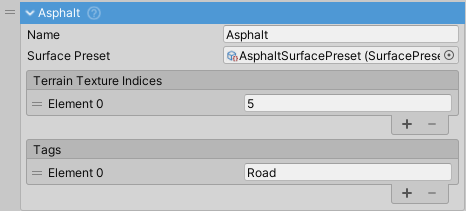
SurfaceMap links terrain textures and object tags to a SurfacePreset that defines surface properties (friction, effects, audio). Each map represents one surface type in your scene.
How It Works
GroundDetection checks each wheel against all SurfaceMap entries to determine which surface the wheel is on. When a match is found, that surface's SurfacePreset is applied to the wheel.
Detection Priority
- Object tags (highest priority) - Allows objects to override terrain textures
- Terrain texture indices - Based on terrain splatmap sampling
- Fallback surface - When no matches are found
This priority system lets tagged objects (roads, bridges, ramps) override terrain textures beneath them.
Properties
Name
Display name for organization and debugging. Does not affect functionality.
Surface Preset
The SurfacePreset defining all properties for this surface type:
FrictionPresetfor wheel physics (grip, slip curves)- Rolling resistance multiplier
- Particle effects (dust/smoke)
- Skidmark appearance and intensity
- Surface-specific audio clips and volumes
Multiple SurfaceMap entries can reference the same SurfacePreset (e.g., different dirt texture variations).
Tags
Unity tags identifying objects as this surface type. When a wheel contacts an object with any of these tags, this surface map matches.
Use cases:
- Non-terrain surfaces (roads, bridges, ramps)
- Objects that override terrain textures
- Indoor environments
Tags must be created in Unity's Tag Manager before use.
Terrain Texture Indices
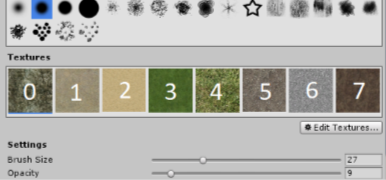
Indices of terrain textures representing this surface type. Corresponds to texture order in terrain's Paint Texture settings.
Important:
- Index 0 = first texture (top-left in Paint Texture panel)
- Zero-based indexing (0, 1, 2, ...)
- Must match exact texture order in terrain setup
- Multiple indices can map to the same surface (e.g., dirt variations)
Adding a Surface Map
Example: Adding a gravel surface.
- Click
+button to add a newSurfaceMap - Set a descriptive name (e.g., "Gravel")
- Assign the gravel
SurfacePreset - Find gravel texture positions in terrain settings. If gravel is at positions 5 and 7, add those numbers to
Terrain Texture Indices - (Optional) Create a tag like
GravelRoadin Tag Manager, assign it to gravel objects in the scene, and add it toTagslist