Sound Manager
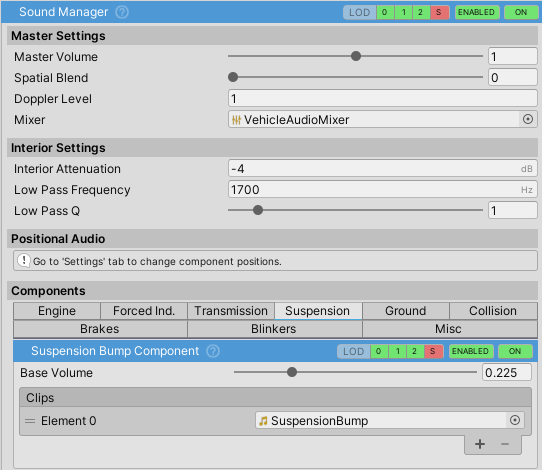
SoundManager handles vehicle sound effects: engine, transmission, impacts, wheels, and auxiliary sounds. It does volume mixing, 3D positional audio, and camera-based interior/exterior filtering.
Master Settings
| Property | Description |
|---|---|
Master Volume |
Volume multiplier for all sound components (0-2). Use Audio Mixer for global volume control across all vehicles |
Spatial Blend |
Controls 2D (0) to 3D (1) positional audio blend. Cannot be changed at runtime |
Doppler Level |
Doppler effect intensity (0 = off, 1 = full) |
Mixer |
Audio mixer for all sound components. Uses VehicleAudioMixer from Resources if not assigned |
Interior Attenuation
When the active camera enters the vehicle, the interiorAttenuation value (in dB) is applied to reduce exterior sound volume. Default is -5 dB, for a muffled in-cabin effect.
Sound Components
SoundManager includes 16 built-in sound components organized into categories:
Engine
| Component | Description |
|---|---|
engineRunningComponent |
Engine idle and running sound |
engineStartStopComponent |
Engine start/stop sounds (first clip = start, second = stop) |
engineFanComponent |
Cooling fan or additional engine layers |
exhaustPopComponent |
Exhaust popping on throttle release |
Forced Induction
| Component | Description |
|---|---|
forcedInductionComponent |
Turbo/supercharger whistle, air intake noise |
turboFlutterComponent |
Turbo wastegate sound |
Transmission
| Component | Description |
|---|---|
transmissionWhineComponent |
Transmission whine from straight-cut gears |
gearChangeComponent |
Gear shift sounds |
Suspension & Ground
| Component | Description |
|---|---|
suspensionBumpComponent |
Suspension hitting bumps/obstacles |
wheelTireNoiseComponent |
Rolling tire noise (tire hum) |
wheelSkidComponent |
Tire skidding/squealing sound |
Collision & Brakes
| Component | Description |
|---|---|
crashComponent |
Collision impact sounds |
airBrakeComponent |
Air brake release sound |
Miscellaneous
| Component | Description |
|---|---|
blinkerComponent |
Turn signal tick-tock (first clip = on, second = off) |
hornComponent |
Horn sound |
reverseBeepComponent |
Reverse warning beep |
Positional Audio
Sound components are organized into positional container GameObjects for 3D audio:
| Container | Description |
|---|---|
EngineAudioSources |
Engine-related sounds (positioned at engine) |
TransmissionAudioSources |
Transmission sounds (positioned at transmission) |
ExhaustAudioSources |
Exhaust sounds (positioned at exhaust point) |
CrashAudioSources |
Impact sounds (positioned at vehicle center) |
OtherAudioSources |
Miscellaneous sounds (positioned at vehicle center) |
Component positions can be changed in the Settings tab.
Audio Mixer
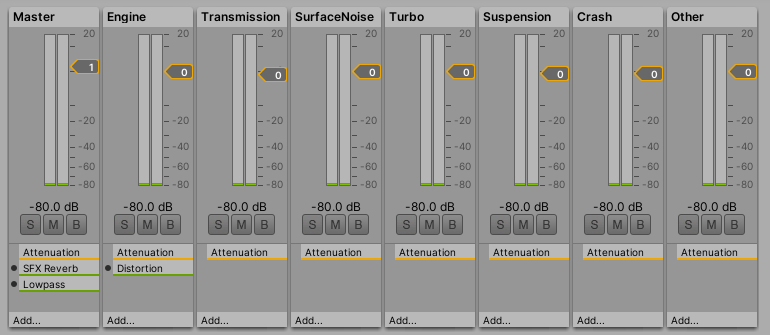
Each sound component is routed to an Audio Mixer group:
| Group | Description |
|---|---|
Engine |
Engine-related sounds |
Transmission |
Transmission-related sounds |
SurfaceNoise |
Wheel/ground interaction sounds |
Other |
Miscellaneous sounds |
Master |
Global control affecting all groups |
Use the Audio Mixer to add effects (e.g., distortion on engine based on load) and adjust volume levels globally.
Runtime API
RegisterExternalSoundComponent(SoundComponent component)
Registers a custom sound component at runtime. The component is initialized, its state loaded, and added to the component list. Use this to add custom sound effects dynamically.