Ground Detection Preset
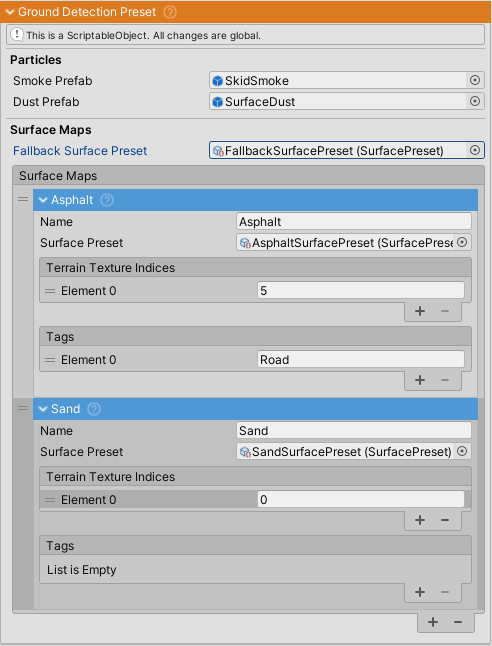
GroundDetectionPreset is a ScriptableObject that centralizes ground detection configuration for vehicles. It prevents the need to configure ground detection settings individually on each vehicle.
Purpose
The preset manages:
- Surface detection mappings (terrain textures and object tags to surface properties)
- Particle effect prefabs for dust/smoke and surface chunks
- Fallback surface preset for unmatched surfaces
- Shared configuration across multiple vehicles
Creating a Preset
Right-click in Project window > Create > NWH > Vehicle Physics 2 > Ground Detection Preset
Setup Workflow
- Assign fallback surface preset (required) - Used when no surface maps match
- Configure surface maps - Link terrain texture indices and object tags to SurfacePresets
- Set up particle prefabs (optional) - For dust/smoke and chunk effects
- Assign to vehicles - Reference this preset in vehicle's GroundDetection component
Properties
Particle Prefabs
| Property | Description |
|---|---|
particlePrefab |
Particle system for dust/smoke effects. The same prefab is used for all surfaces, with appearance controlled by individual SurfacePreset settings (color, size, emission rate). Leave null if no particle effects are needed |
chunkPrefab |
Particle system for surface chunks (dirt, stones, debris) thrown behind wheels. Requires physics simulation with gravity. Leave null if no chunk effects are needed |
Surface Configuration
| Property | Description |
|---|---|
fallbackSurfacePreset |
(Required) Surface preset used when no surface maps match the current terrain texture or object tag. Typically set to the most common surface type in your scene (e.g., asphalt or grass) |
surfaceMaps |
Collection of SurfaceMap objects that define how terrain textures and object tags map to surface presets. Each SurfaceMap contains: terrain texture indices, object tags, and reference to the SurfacePreset |
Example Configuration
- Create SurfacePresets for each surface type (Asphalt, Grass, Dirt, Sand)
- Add SurfaceMaps to the list:
- Asphalt: texture index 0, tag "Road"
- Grass: texture indices 1,2, tag "Grass"
- Sand: texture index 3, tag "Sand"
- Assign appropriate SurfacePreset to each SurfaceMap
- Set fallbackSurfacePreset to Asphalt (most common)
Related Classes
- GroundDetection - Component that uses this preset
- SurfaceMap - Defines mapping between detection methods and SurfacePreset
- SurfacePreset - Defines friction, particles, skidmarks, and audio for a surface type