Ground Detection
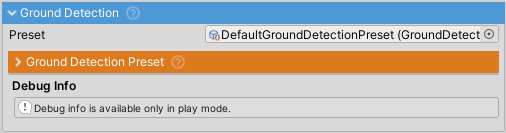
Determines which FrictionPreset, effects, and sounds apply to each wheel based on surface type. Samples terrain textures and object tags to switch friction and rolling resistance as the wheel changes surface.
Detection Priority
When a wheel contacts a surface:
- GameObject tags - Checked first (highest priority)
- Terrain texture splatmaps - Sampled if no tag matches
- Fallback surface preset - Applied if no matches found (required)
Configuration centralized in GroundDetectionPreset ScriptableObject.
Ground Detection Preset
ScriptableObject containing:
- Surface Maps - Texture indices/tags mapped to SurfacePresets
- Fallback surface - Required default when no matches found
- Particle prefabs - Dust/smoke and chunk effects
Create: Right-click > Create > NWH > Vehicle Physics 2 > Ground Detection Preset
Required: Must assign fallbackSurfacePreset or ground detection will not function.
Surface Maps
Each entry maps terrain textures or object tags to a SurfacePreset:
- Terrain texture indices - 0-based, matches Terrain Layer order
- GameObject tags - String tags assigned to objects
- SurfacePreset - Defines friction, rolling resistance, sounds, particles
Performance
Checks all wheels each cycle using a coroutine (no per-frame raycasting overhead). Configure groundDetectionInterval:
- 0.05s - High responsiveness (player vehicle)
- 0.1s - Balanced (default)
- 0.2s - Low CPU (AI vehicles)
Interval is randomized ±20% on initialization to prevent multiple vehicles from updating simultaneously. Worst-case detection latency equals the interval.
Dominant Surface
Tracks which surface type has the most wheels in contact. Updated each detection cycle by counting wheels per surface. Used for vehicle-wide effects like engine sounds and UI feedback. Returns null when no wheels are grounded.
Setup
Basic Setup
- Create GroundDetectionPreset (Right-click > Create > NWH > Vehicle Physics 2 > Ground Detection Preset)
- Assign
fallbackSurfacePreset(required) - Configure Surface Maps:
- For terrains: Note Terrain Layer order, assign texture indices (0-based)
- For objects: Tag GameObjects, add matching tags to Surface Maps
- Assign GroundDetectionPreset to VehicleController > FX > Ground Detection
- Each Surface Map links to a SurfacePreset defining friction and effects
Terrain Texture Setup
Texture indices correspond to Terrain Layer order (first layer = 0, second = 1, etc.). Check terrain settings to verify layer order matches your indices.
Object Tag Setup
Tag objects with surface type strings ("Asphalt", "Gravel", etc.). Add matching tags to Surface Maps. Tags have priority over terrain textures.
How It Works
When a surface is detected for a wheel:
WheelController.activeFrictionPresetis updated with the surface's FrictionPreset- Rolling resistance multiplier is applied to the wheel
- EffectManager uses the SurfacePreset for particles and skidmarks
- SoundManager uses the SurfacePreset for rolling/skidding sounds
Changes take effect immediately but detection latency depends on groundDetectionInterval.
Troubleshooting
Wrong surface detected
- Verify texture indices match Terrain Layer order (0-based)
- Check GameObject tags exactly match Surface Map tags (case-sensitive)
- Use Scene view gizmos to see detected surface per wheel
Delayed surface changes
- Reduce
groundDetectionIntervalfor faster response - All wheels are checked each cycle; worst-case latency equals the interval
No effects/sounds
- Verify SurfacePreset has assigned FrictionPreset
- Check SurfacePreset has audio clips and particle settings
- Ensure EffectManager and SoundManager are enabled on VehicleController
Fallback surface errors
- GroundDetectionPreset requires
fallbackSurfacePresetassignment - Create a generic SurfacePreset if missing