Friction Preset
FrictionPreset is a ScriptableObject containing tire friction characteristics for specific surface types. It defines the friction curve that determines how tire grip varies with slip using the Pacejka Magic Formula.
Create different presets for asphalt, gravel, ice, mud, or custom surface conditions. Assign to WheelController.activeFrictionPreset or change dynamically based on surface detection.
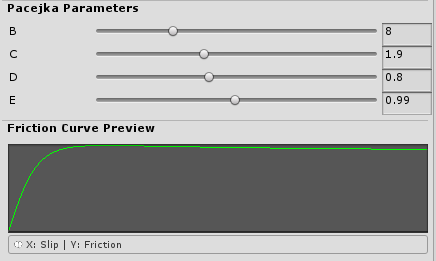
Friction Curve Overview
WheelController uses slip-based friction. Tires always have some slip under normal conditions (near the left side of the curve below).
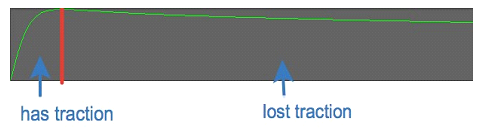
The friction curve maps slip ratio (X-axis, 0-1) to friction coefficient (Y-axis):
- Left side (has traction): Normal tire operation, small slip, maximum grip
- Peak: Optimal slip for maximum traction (typically 0.10-0.20 for asphalt)
- Right side (lost traction): Tire sliding, reduced grip
Pacejka Parameters (BCDE)
The curve uses the Pacejka Magic Formula with four parameters stored in the BCDE Vector4:
B (Stiffness Factor, 0-30, typical 10-20)
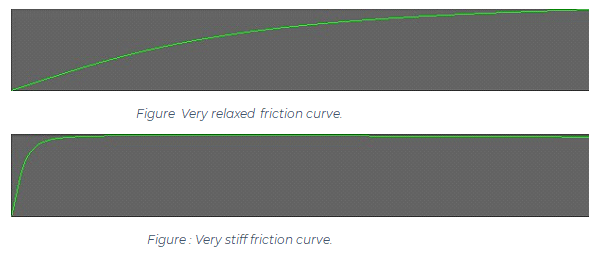
Controls initial slope and response. Higher values create a steeper curve that reaches peak faster.
- Higher B: More responsive, sharper peak, easier to spin out (sports tires)
- Lower B: Softer response, wider peak, more stable (comfort tires)
- Very low B: Acts like ice
C (Shape Factor, 0-5, typical 1.3-1.8)
Defines curve shape and peak height.
- Higher C: Taller, narrower, pointier peak
- Lower C: Flatter, wider peak
D (Peak Value, 0-2, typical 0.8-1.2)
Maximum friction coefficient. Higher values = more overall grip.
- Higher D: More traction (racing slicks)
- Lower D: Less grip (wet/ice conditions)
E (Curvature Factor, 0-2, typical 0.9-1.0)
Controls falloff shape after the peak.
- E near 1.0: Gradual falloff, horizontal after peak, less difference between gripped and sliding
- E < 1.0: Sharper falloff, steeper drop, more slide after traction loss
Example Presets
| Surface | B | C | D | E | Notes |
|---|---|---|---|---|---|
| Dry Tarmac | 10 | 1.6 | 1.0 | 0.98 | Default balanced grip |
| Race Slick | 15 | 1.8 | 1.3 | 0.95 | High grip, sharp response |
| Wet Road | 8 | 1.5 | 0.75 | 1.0 | Reduced grip, softer response |
| Gravel | 7 | 1.4 | 0.7 | 1.0 | Lower peak, gradual falloff |
| Ice | 5 | 1.3 | 0.2 | 1.0 | Very low grip, very soft |
Separate Lateral Friction
FrictionPreset supports separate lateral (cornering) friction via BCDELateral. If set to zero (default), the longitudinal curve is used for both directions.
Gotcha: lateral B, C and D must all be non-zero for the lateral curve to be used. The formula is
D * sin(C * atan(...)), so leaving any one of them at zero produces zero grip at every slip angle. Dragging one lateral slider and leaving the rest at zero is the usual way to hit this. The inspector warns when the lateral parameters are only partly filled and falls back to the longitudinal curve until all three are set.
On loose surfaces (gravel, sand), lateral grip typically peaks earlier and falls off faster than longitudinal. Set BCDELateral to different values for realistic multi-directional behavior.
The editor provides a "Copy from Longitudinal" button to start with matching curves, then adjust as needed.
Workflow
- Create: Right-click in Project → Create → NWH/Vehicle Physics 2/Friction Preset
- Adjust BCDE: Use sliders in inspector (auto-updates curve preview)
- Optional Lateral: Set BCDELateral for separate cornering behavior
- Generate: Click "Generate Curves" or wait for auto-update
- Assign: Set in WheelController inspector or via GroundDetection/SurfaceMap
The curve preview updates automatically when parameters change. The generated AnimationCurve is for visualization - the actual friction calculation uses optimized lookup tables generated at runtime.