Cruise Control Module
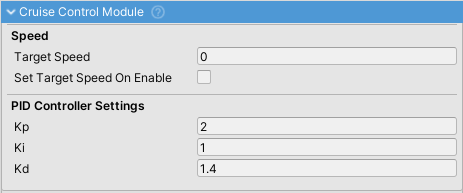
Maintains a target vehicle speed using a PID (Proportional-Integral-Derivative) controller.
Features
- Automatic Speed Maintenance: Controls throttle and optionally brakes to hold target speed
- PID-Based Control: Smooth acceleration and deceleration without hunting
- Safety Features: Automatically disengages when brakes are pressed or vehicle stops/reverses
- Works in Forward Motion Only: Ignored in reverse
Key Settings
Speed
| Property | Description |
|---|---|
Target Speed |
Speed the module will maintain (m/s) |
Set Target Speed On Enable |
Automatically uses current speed when activated |
Apply Brakes When Speeding |
If enabled, applies brakes on downhill sections; if disabled, only reduces throttle |
Deactivate On Brake |
Cruise control disengages when brake pedal is pressed |
PID Controller Settings
Fine-tune speed control behavior:
| Property | Description |
|---|---|
Kp (Proportional) |
Primary response to speed error (0.3-1.0). Higher = faster response but may oscillate |
Ki (Integral) |
Eliminates steady-state error over time (0.1-0.5). Increase if speed settles incorrectly |
Kd (Derivative) |
Reduces overshooting (0.05-0.3). Higher = more stable but slower response |
Activation
Toggle cruise control via the cruise control input binding. When activated, target speed is set to current vehicle speed. Read cruiseControlActive to update UI indicators.
Usage Notes
- Only works when moving forward
- Automatically deactivates if speed reaches zero or vehicle goes in reverse
- Target speed is in m/s (multiply by 3.6 for km/h, by 2.237 for mph)