Clutch Component
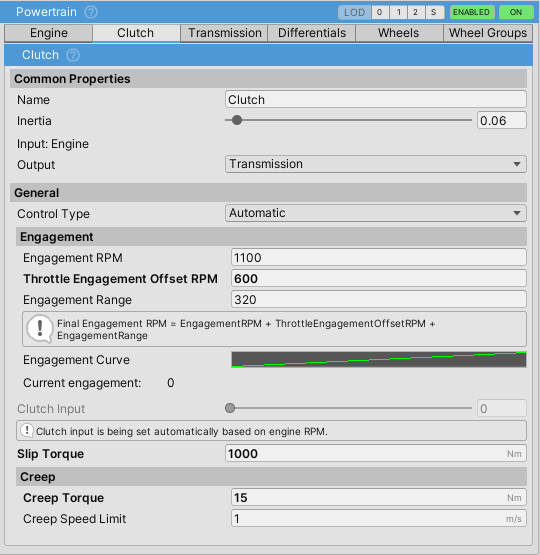
The ClutchComponent couples the engine to the transmission through friction. Has several control modes, with automatic lockup and stall prevention.
Can be bypassed by setting the engine output directly to transmission, but this is not recommended as it will cause engine stalling in most cases.
Control Types
| Type | Description |
|---|---|
Automatic |
Clutch engages/disengages automatically based on engine RPM, vehicle speed, and throttle input. Best for arcade games or automatic transmissions |
UserInput |
Controlled by player through the Clutch axis input. Required for manual transmission simulation. See Input for configuration |
Manual |
Input must be controlled via script. Use for custom logic or AI vehicles |
Engagement
The automatic clutch uses RPM-based engagement with the following parameters:
| Property | Description |
|---|---|
Engagement RPM |
Base RPM at which the clutch begins to engage. Should be above idle RPM to prevent stalling |
Engagement Range |
RPM range over which the clutch transitions from 0% to 100% engaged. Example with engagementRPM = 1200 and engagementRange = 400: At 1200 RPM: 0% engaged, At 1400 RPM: 50% engaged, At 1600 RPM: 100% engaged. Lower values give sharper engagement, higher values give smoother engagement |
Throttle Engagement Offset RPM |
Additional RPM added to engagement point based on throttle input squared. Raises engagement point when accelerating hard to prevent lugging |
Engagement Curve |
AnimationCurve mapping clutch input (0-1) to actual engagement (0-1). Default is linear. Can be customized for progressive or aggressive clutch feel |
The clutch engages gradually at 2.0/s but disengages instantly when needed (shifting, braking, stall prevention).
Slip Torque
| Property | Description |
|---|---|
Slip Torque |
Maximum torque (in Nm) that the clutch can transfer when fully engaged. Acts as the friction capacity of the clutch disc. Should be set to 1.2-1.5x the engine's peak torque. Too low: clutch slips under load, power loss. Too high: grabby engagement, potential solver instability with low-inertia components. Values near zero make the engine rev freely as if the clutch is slipping |
Lockup
The automatic clutch includes lockup to keep the clutch fully engaged at higher speeds:
| Property | Description |
|---|---|
Lockup Speed |
Vehicle speed (m/s) above which the clutch locks fully engaged. Default: 1 m/s |
Lockup RPM Factor |
Engine RPM must be above idleRPM * lockupRPMFactor for lockup. Default: 1.1. Prevents lockup when engine is about to stall |
Lockup blends gradually over 200 RPM and 1 m/s above thresholds for smooth transition.
High-Speed Lockup Protection
Prevents engine stall during hard braking by disengaging the clutch when wheel lockup is detected. Uses a stateless blend approach that naturally recovers.
| Property | Description |
|---|---|
High Speed Lockup Protection |
Enable/disable protection. Default: enabled |
Lockup Slip Threshold |
Longitudinal slip threshold (0.1-0.9) that triggers protection. Higher = later intervention. Default: 0.4 |
RPM Match Tolerance |
How closely engine RPM must match expected wheel RPM for recovery (0.05-0.4). Lower = slower but smoother recovery. Default: 0.2 |
Lockup Protection Min Speed |
Minimum speed (m/s) for protection to activate. Below this, normal behavior is used. Default: 5 m/s |
How It Works:
Uses a continuous blend value (0-1) instead of discrete states:
- When braking with high wheel slip: blend ramps up quickly (10/s)
- When conditions clear: blend decays slowly (2/s) - natural timeout
- When engine RPM matches wheel RPM: recovery accelerates (5/s)
- Clutch engagement interpolates between normal target and zero based on blend
The lockupProtectionActive boolean indicates when protection is active (blend > 0.1).
Stall Prevention
| Property | Description |
|---|---|
Brake Disengage Threshold |
Brake input (0-1) above which the clutch disengages at low speeds. Prevents stalling when braking to a stop. Set to 1 to disable. Default: 0.5 |
The clutch also disengages instantly when:
- Engine RPM drops below idle
- Transmission is shifting
- Gear is neutral
Creep
Simulates torque converter drag in automatic transmissions. The vehicle slowly moves forward when in gear without throttle.
| Property | Description |
|---|---|
Creep Torque |
Torque (Nm) passed through even when disengaged. Should be higher than rolling resistance to move the vehicle. Set to 0 to disable. Default: 0 |
Creep Speed Limit |
Maximum speed (m/s) at which creep is active. Default: 1 m/s |
Scripting
Manual Control
VehicleController vc = GetComponent<VehicleController>();
ClutchComponent clutch = vc.powertrain.clutch;

// Switch to manual control
clutch.controlType = ClutchComponent.ClutchControlType.Manual;

// Set clutch position (0 = disengaged, 1 = engaged)
clutch.clutchInput = 0.5f;

// Read current engagement
float engagement = clutch.Engagement;
Adjusting Automatic Behavior
ClutchComponent clutch = vc.powertrain.clutch;

// Raise engagement point for sporty feel
clutch.engagementRPM = 1800f;
clutch.engagementRange = 300f;

// Configure lockup protection
clutch.highSpeedLockupProtection = true;
clutch.lockupSlipThreshold = 0.3f;
clutch.lockupProtectionMinSpeed = 10f;
Checking Protection State
ClutchComponent clutch = vc.powertrain.clutch;

if (clutch.lockupProtectionActive)
{
    Debug.Log("Lockup protection active - engine protected from stall");
}
Tips
- For arcade/racing feel: use higher
engagementRPM(1800-2000) and lowerengagementRange(200-300) for quicker response - For realistic simulation: enable
highSpeedLockupProtectionand tune thresholds based on tire grip - If vehicle drags at low speeds: reduce
creepTorqueor increasecreepSpeedLimit - If clutch feels grabby during maneuvers: increase
engagementRangeor lowerslipTorque - If clutch oscillates/hunts: increase
engagementRangeto 500-600 - For quicker launches: increase
throttleEngagementOffsetRPMto raise engagement point under throttle