Camera Mouse Drag
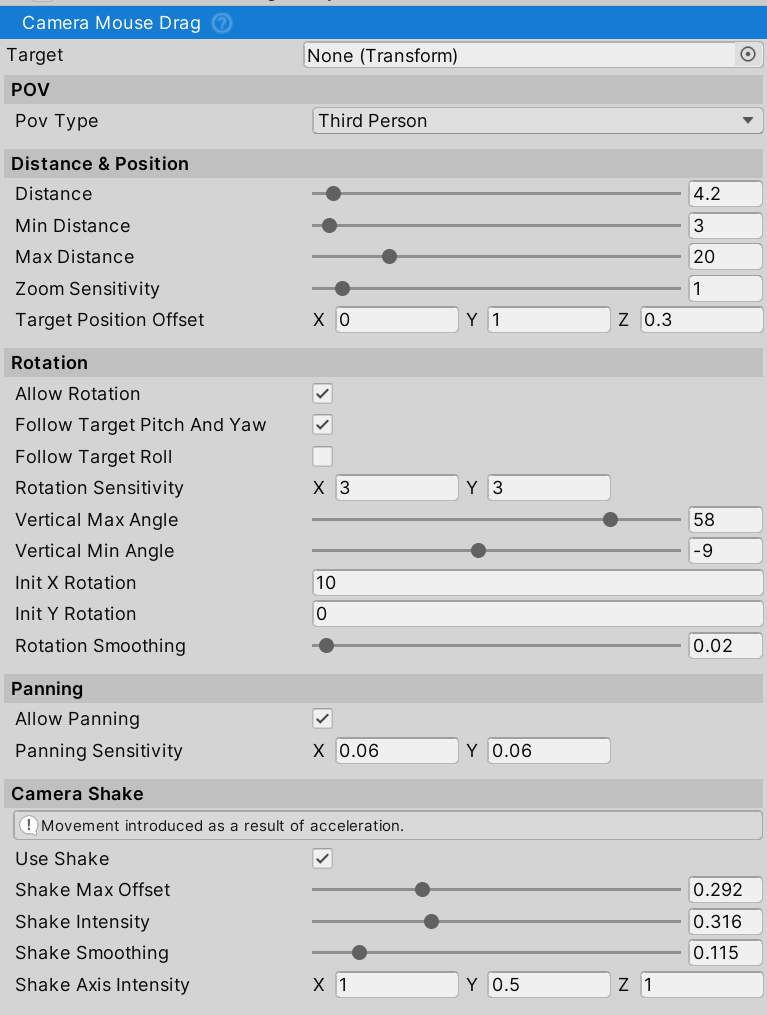
Mouse-based camera with rotation, panning, zoom, and dynamic Forza-style features. Works in first-person and third-person.
Note: CameraMouseDrag is part of NWH Common. For full camera system documentation, setup examples, and advanced configurations, see NWH Common - Camera System.
Setup
- Attach to any
CameraGameObject - Assign
Target(optional - auto-finds vehicle if empty) - Configure
POV Type: FirstPerson or ThirdPerson
Controls
- Left Mouse Button (LMB): Rotate camera (hold and drag)
- Middle Mouse Button (MMB): Zoom (third-person only)
- Right Mouse Button (RMB): Pan camera
Key Features
POV Settings
- POV Type: FirstPerson (inverted controls, no zoom) or ThirdPerson
- Allow Rotation: Enable/disable manual rotation
- Allow Panning: Enable/disable panning
Distance & Position (Third-Person)
- Distance: Base distance from target (min/max clamping)
- Zoom Sensitivity: Mouse wheel sensitivity
- Target Position Offset: Look-at point offset from target center
Rotation
- Follow Target Pitch/Yaw: Rotate camera with vehicle X/Y axis
- Follow Target Roll: Rotate camera with vehicle Z axis (banking)
- Rotation Sensitivity: Input sensitivity (X/Y)
- Vertical Angle Limits: Clamp vertical rotation (min/max)
- Init Rotation: Initial X/Y rotation on start
- Rotation Smoothing: Damping for smooth transitions
Third-Person Dynamics
Auto-Centering: Camera returns behind vehicle after rotation stops
- Delay before centering starts
- Speed of centering
- Minimum vehicle speed required
Speed-Based FOV: Field of view widens at high speeds
- Base FOV (stationary)
- Max FOV (at speed)
- Speed range for transition
Speed-Based Distance: Camera pulls back at higher speeds
- Distance multiplier per m/s
- Maximum additional distance
Speed-Based Height: Camera rises at higher speeds
- Height multiplier per m/s
- Maximum additional height
Look-Ahead: Camera anticipates turns based on angular/lateral velocity
- Intensity (max yaw offset)
- Smoothing for transitions
Camera Shake
Acceleration-based movement for realism:
- Max Offset: Maximum shake displacement
- Intensity: Shake magnitude per G-force
- Smoothing: Damping for shake transitions
- Axis Intensity: Per-axis shake multipliers (X/Y/Z)