Submarine
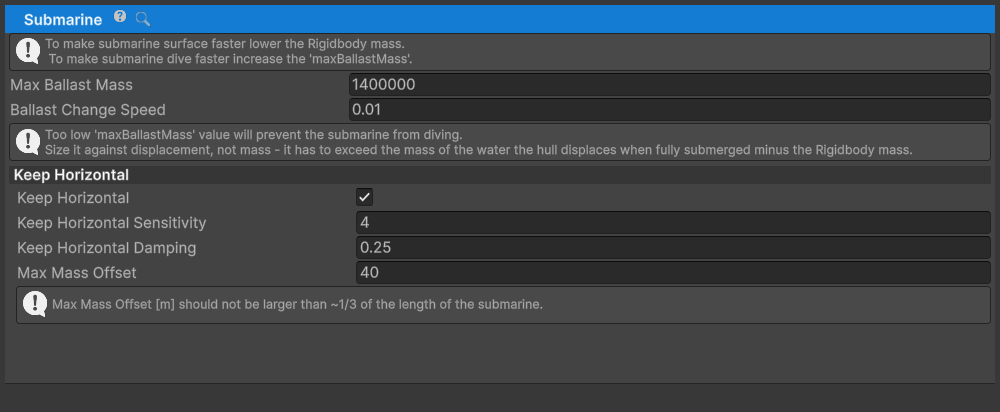
Submarine adds variable ballast and optional leveling to an
AdvancedShipController. The current implementation changes the same
GameObject's Rigidbody.mass and Rigidbody.centerOfMass directly. It does not
require VariableCenterOfMass.
Submarine requires AdvancedShipController and Rigidbody components on the
same GameObject.
Fields and properties
ballastChangeSpeedcontrols ballast change per second as a proportion ofmaxBallastMass.maxBallastMassis the maximum added ballast in kilograms.keepHorizontalenables center-of-mass shifting for automatic leveling.keepHorizontalSensitivitycontrols the leveling response.maxMassOffsetlimits the leveling offset applied to the Rigidbody center of mass.DepthInputaccepts -1 for surfacing through +1 for diving.BallastMassreports the currently added ballast.TotalMassreports base Rigidbody mass plus current ballast.
The component caches the Rigidbody's starting mass and center of mass in
Start. Ballast is clamped between zero and maxBallastMass.
Setup
- Configure a working vessel with
Rigidbody,WaterObject, andAdvancedShipController. - Add
Submarineto the same GameObject as theRigidbodyandAdvancedShipController. - Set
maxBallastMassandballastChangeSpeed. - Optionally enable
keepHorizontal, then tunekeepHorizontalSensitivityandmaxMassOffset. - Set up the
SubmarineDepthaction through a ship input provider. The shipped Input System bindings use K for surface (-1) and I for dive (+1).
When AdvancedShipController.input.autoSetInput is enabled, Submarine reads
the combined SubmarineDepth() value from all scene
ShipInputProvider components. When automatic input is disabled, set
Submarine.DepthInput from code.
Upgrading from product release 14.1
Product release 14.2 changed ShipInputStates.submarineDepth to the complete
-1 to +1 range. This product release number is separate from the UPM package
version described in the changelog.
For a custom UI wired through
MobileShipInputProvider.submarineDepthSlider, set the slider's minValue to
-1. The shipped keyboard and Input System bindings already provide both
directions.