HUD_Turn
Purpose and Role
The HUD_Turn instrument displays aircraft roll (bank angle) on a turn coordinator or turn indicator. It reads the Roll property from the aircraft controller and rotates an indicator to show how much the aircraft is banked. This instrument provides visual feedback of aircraft banking for coordinated turn control.
Data Source and Update Mechanism
The instrument continuously reads:
- Roll from
AircraftController.Roll(degrees, -180 to +180) - Updates every frame in
LateUpdate() - Roll represents aircraft bank angle relative to wings-level
Configuration Properties
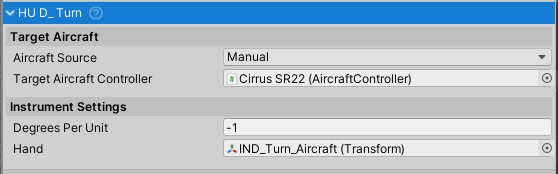
Hand (Transform) - The rotating turn/roll indicator
- Usually represented as an airplane icon or needle
- Points left for left bank, right for right bank
- Rotates around Z-axis based on aircraft roll
Degrees Per Unit (float) - Rotation degrees per degree of roll
- Default: -1.0
- Negative indicates counter-clockwise rotation
- Directly multiplied by roll angle
Roll and Turn Representation
Roll Display
Roll from AircraftController.Roll:
- 0° = Wings level (straight flight)
- Positive = Right bank (right wing down)
- Negative = Left bank (left wing down)
- ±90° = Wings perpendicular
- ±180° = Inverted
Turn Indicator Rotation
Hand Rotation = Roll * degreesPerUnit
With default degreesPerUnit = -1.0:
- 0° roll: Hand at 0° (centered/wings level)
- +30° roll: Hand at -30° (right bank)
- -30° roll: Hand at +30° (left bank)
- ±90° roll: Hand at ±90° (vertical bank)
Aircraft Source Configuration
- Manual Source (default) - Directly assign aircraft in inspector
- Vehicle Changer Source - Automatically switches to active vehicle
Setup Instructions
Basic Setup
- Create or import turn coordinator visual (typically shows aircraft silhouette)
- Create hand/indicator showing bank angle
- Assign hand Transform to Hand property
- Set Degrees Per Unit (-1.0 for standard counter-clockwise)
- Assign target aircraft controller
- Test by banking aircraft and observing indicator movement
Calibration
- Fly aircraft level (0° roll) - indicator should point straight/centered
- Bank left (-30°) - indicator should point left
- Bank right (+30°) - indicator should point right
- Roll to vertical (+90°) - indicator should point far right
- If reversed, change sign of degreesPerUnit
Public API
Properties (Read-only)
All properties configured in inspector.
Common Usage Patterns
Basic Turn Indication
HUD_Turn turnIndicator = GetComponent<HUD_Turn>();

// Automatically updates with aircraft roll
// No additional code needed for basic operation
Detecting Common Maneuvers from Roll Angle
AircraftController aircraft = targetAircraftController;
float rollAngle = aircraft.Roll;

// Detect common flight maneuvers by roll angle
// Note: Standard rate turns require measuring heading change (3° per second)
// Bank angle alone is insufficient - same bank produces different turn rates at different speeds

bool isLevel = Mathf.Abs(rollAngle) < 5f;              // Wings nearly level
bool isShallowTurn = Mathf.Abs(rollAngle) >= 5f && Mathf.Abs(rollAngle) <= 15f;
bool isMediumTurn = Mathf.Abs(rollAngle) > 15f && Mathf.Abs(rollAngle) <= 30f;
bool isSteepTurn = Mathf.Abs(rollAngle) > 30f;
bool isTurningRight = rollAngle > 0f;
Integration with Other Systems
- AircraftController - Source of roll data
- VehicleChanger - Optional automatic aircraft source switching
- HUD_Instrument - Base class for instrument functionality
- Flight Control Systems - Can be used for turn coordination feedback
Real-World Context
Bank Angle Standards
Real aircraft bank angles for common maneuvers:
- Level flight: 0° bank
- Shallow turn: 5-10° bank
- Standard rate turn: 15-25° bank (depends on airspeed)
- Medium turn: 25-30° bank
- Steep turn: 35-45° bank
- Knife edge: 90° bank (wings perpendicular)
Turn Coordinator Function
The turn indicator (turn coordinator) combines two functions:
- Turn rate: Indicates if aircraft is turning left/right
- Bank angle: Indicates banking attitude
The NWH instrument focuses on bank angle display, which is closely related to turn rate.
Coordinated Flight
A coordinated turn uses the turn indicator to:
- Roll aircraft to desired bank angle
- Maintain constant airspeed
- Use rudder to coordinate with ailerons
- Monitor for slip/skid condition
Troubleshooting
Indicator Not Moving
- Verify hand Transform is assigned
- Check targetAircraftController is valid
- Confirm aircraft has valid roll angle
- Verify degreesPerUnit is not zero
Indicator Moving Wrong Direction
- Flip sign of Degrees Per Unit (-1 ↔ 1)
Indicator Always Centered
- Check aircraft roll calculation
- Verify aircraft has valid physics Rigidbody
- Confirm no conflicting code resetting roll
Related Classes
HUD_Instrument- Base class for all flight instrumentsAircraftController- Source of roll dataHUD_Airspeed- Airspeed display instrumentHUD_Altimeter- Altitude display instrumentHUD_Attitude- Pitch/roll attitude indicatorHUD_Heading- Compass heading indicatorHUD_VerticalSpeed- Vertical speed indicator