HUD_Heading
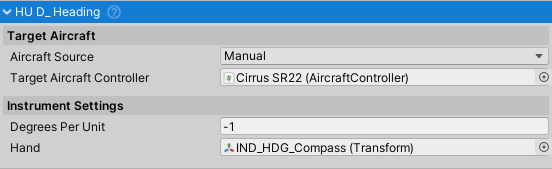
Purpose and Role
The HUD_Heading instrument displays aircraft compass heading on a rotating dial. It reads the Heading property from the aircraft controller and rotates a heading indicator dial to show current magnetic/compass heading (0-360°). The instrument provides real-time directional feedback for navigation and flight planning.
Inherits from HUD_Instrument, which provides aircraft controller integration and automatic source management.
Key Features
- Real-time magnetic heading display (0-360°)
- Rotating dial representation matching aviation standards
- Support for both 2D UI Canvas and 3D cockpit instruments
- Compatible with ShiftingOrigin for large-scale worlds
- Real-time heading tracking via
LateUpdate()
Data Source and Update Mechanism
The instrument continuously reads:
- Heading from
AircraftController.Heading(degrees, 0-360) - Updates every frame in
LateUpdate() - Heading is based on aircraft forward direction
Public API
Properties
hand
Type: Transform
The transform representing the rotating heading indicator dial. Completes one full rotation (360°) per 360° of heading change.
- Usually a disc with 0-360 degree markings
- Can be implemented as simple plane or 3D model
- Rotates around local Z-axis based on aircraft heading
degreesPerUnit
Type: float
Default: -1.0
Defines the rotation in degrees per degree of heading change. This value is directly multiplied by the heading angle:
- Default: -1.0 (negative = counter-clockwise rotation)
- Standard for aviation heading indicators
- Positive values create clockwise rotation
- Range: -1.0 to 1.0 for standard behavior
Inherited Properties
From HUD_Instrument:
targetAircraftController
Type: AircraftController
The aircraft controller that provides heading data via the Heading property (0-360° magnetic heading).
aircraftSource
Type: AircraftSource (enum: Manual, VehicleChanger)
Determines how the target aircraft is assigned:
Manual: Manually assign via Inspector or codeVehicleChanger: Automatically tracks active vehicle from VehicleChanger system
Heading Measurement and Display
Heading Reference
Heading from AircraftController.Heading:
- 0° = North
- 90° = East
- 180° = South
- 270° = West
Dial Rotation
Hand Rotation = Heading * degreesPerUnit
With default degreesPerUnit = -1.0:
- 0° heading: Hand at 0° rotation (North pointing up)
- 90° heading: Hand at -90° rotation (East pointing right)
- 180° heading: Hand at -180° rotation (South pointing down)
- 270° heading: Hand at -270° rotation (West pointing left)
Aircraft Source Configuration
- Manual Source (default) - Directly assign aircraft in inspector
- Vehicle Changer Source - Automatically switches to active vehicle
Setup Guide
1. Basic Configuration
- Add
HUD_Headingcomponent to your instrument GameObject - Assign the hand transform to the
handproperty (should rotate around Z-axis) - Set
targetAircraftControllerto your aircraft (or useVehicleChangermode) - Set
degreesPerUnitto -1.0 for standard counter-clockwise rotation - Optionally adjust
degreesPerUnitsign for clockwise rotation
2. Hand Positioning and Orientation
For 3D cockpit instruments:
- Verify that hand transforms have their Z-axis set as the rotation axis in your 3D modeling software
- If not possible, create an empty parent GameObject oriented correctly and attach the visual mesh as a child
- Set Unity editor to Pivot/Local mode (top-left toolbar) to verify rotation axes
3. Cardinal Direction Calibration
To verify proper heading display:
- Fly aircraft heading North (0°) - hand should point up
- Fly heading East (90°) - hand should point right
- Fly heading South (180°) - hand should point down
- Fly heading West (270°) - hand should point left
- If rotation is reversed, change sign of
degreesPerUnitfrom -1.0 to 1.0
4. Canvas vs 3D Instruments
Canvas (2D UI):
- Works out-of-box with RectTransforms
- Use for HUD overlays or glass cockpit displays
3D Cockpit:
- Requires proper pivot point setup (see Hand Positioning above)
- Reference the Cirrus SR22 aircraft in demo scenes for example setup
- Ensure local rotation around Z-axis is correctly configured
Code Examples
Basic Setup via Code
using NWH.Aerodynamics.AircraftController.Instruments;
using UnityEngine;

public class HeadingSetup : MonoBehaviour
{
    void Start()
    {
        // Get or add heading component
        HUD_Heading heading = GetComponent<HUD_Heading>();

        // Assign aircraft
        heading.targetAircraftController = FindObjectOfType<AircraftController>();

        // Assign hand transform (assumes child named appropriately)
        heading.hand = transform.Find("HeadingHand");

        // Set for counter-clockwise rotation (standard)
        heading.degreesPerUnit = -1.0f;
    }
}
Dynamic Aircraft Switching
using NWH.Aerodynamics.AircraftController.Instruments;

public class CockpitManager : MonoBehaviour
{
    [SerializeField] private HUD_Heading headingIndicator;

    public void SwitchAircraft(AircraftController newAircraft)
    {
        // Manual aircraft switching
        headingIndicator.targetAircraftController = newAircraft;
    }

    public void EnableAutoTracking()
    {
        // Switch to VehicleChanger mode for automatic tracking
        headingIndicator.aircraftSource = HUD_Instrument.AircraftSource.VehicleChanger;
    }
}
Custom Heading with Magnetic Declination
using NWH.Aerodynamics.AircraftController.Instruments;
using UnityEngine;

public class CustomHeadingIndicator : HUD_Heading
{
    [SerializeField] private float magneticDeclination = 10f; // degrees

    new void LateUpdate()
    {
        if (targetAircraftController == null) return;

        // Apply magnetic declination for true heading display
        float magneticHeading = targetAircraftController.Heading;
        float trueHeading = (magneticHeading + magneticDeclination) % 360f;

        // Manually set hand rotation
        float rotation = trueHeading * degreesPerUnit;
        hand.localEulerAngles = new Vector3(0, 0, rotation);
    }
}
Common Usage Patterns
Basic Navigation
HUD_Heading headingIndicator = GetComponent<HUD_Heading>();

// Automatically updates with aircraft heading
// No additional code needed for basic operation
Heading Constraints
// To display only cardinal directions:
// 0°/360° = N, 90° = E, 180° = S, 270° = W
float cardinalHeading = Mathf.Round(heading / 90f) * 90f;
Integration with Other Systems
- AircraftController - Source of heading data
- VehicleChanger - Optional automatic aircraft source switching
- HUD_Instrument - Base class for instrument functionality
- Navigation Systems - Can be used with GPS/waypoint systems
Real-World Context
Heading vs Magnetic Compass
- This instrument represents magnetic heading
- Real aircraft account for magnetic declination (true heading vs magnetic)
- NWH implementation simplifies this by using direct aircraft heading
- For realistic navigation, apply declination correction to heading
Compass Rose
Standard aviation heading indicator markings:
        N (0°)
   NW (315°) | NE (45°)
        |
W (270°)----E (90°)
        |
   SW (225°) | SE (135°)
        S (180°)
Heading Standards
Aviation standard heading conventions:
- Magnetic heading: What compass shows (affected by magnetic declination)
- True heading: Actual compass direction to true north
- Heading bug: Selected desired heading
- Track: Actual ground track (affected by wind)
Technical Notes
Heading Calculation Details
The heading value is directly multiplied by degreesPerUnit to produce hand rotation:
handRotation = heading * degreesPerUnit- No normalization or wrapping required (heading is already 0-360°)
- Rotation is applied to local Z-axis via
localEulerAngles
ShiftingOrigin Compatibility
When ShiftingOrigin is present in the scene, AircraftController.Heading accounts for world offset, ensuring consistent heading readings in large worlds without floating-point precision issues.
Coordinate System
- Heading is measured relative to aircraft forward direction (Y-axis in aircraft local space)
- All rotations are applied to local Z-axis (perpendicular to instrument face)
- Uses
localEulerAnglesfor rotation to maintain independence from parent transforms
Update Timing
The instrument updates every frame in LateUpdate(), which occurs after physics simulation and normal Update() calls. This ensures:
- Aircraft position and rotation are finalized before heading is read
- Smooth, predictable dial movement
- Proper synchronization with visual frame rate
Troubleshooting
Heading Not Rotating
- Verify hand Transform is assigned
- Check targetAircraftController is valid and has AircraftController component
- Confirm aircraft has valid heading value (0-360°)
- Verify degreesPerUnit is not zero
Heading Rotating Wrong Direction
- Flip sign of
degreesPerUnit(-1.0 ↔ 1.0) - Verify hand transform rotates around Z-axis (not X or Y)
Heading Jumps or Rotates Erratically
- Normal during rapid heading changes (aircraft yaw)
- Check aircraft physics timestep settings
- Verify no multiple components updating same transform
- Ensure hand transform is not being modified elsewhere
Related Classes
HUD_Instrument- Base class for all flight instrumentsAircraftController- Source of heading dataHUD_Airspeed- Airspeed display instrumentHUD_Altimeter- Altitude display instrumentHUD_Attitude- Pitch/roll attitude indicatorHUD_Turn- Turn rate indicatorHUD_VerticalSpeed- Vertical speed indicator