HUD_Attitude
Purpose and Role
The HUD_Attitude instrument displays aircraft pitch and roll attitude on a moving artificial horizon display. It reads the Pitch and Roll properties from the aircraft controller and translates them into visual pitch/roll representation through a rotating horizon line or pitch ladder. This creates the classic "artificial horizon" or "attitude indicator" found in aircraft cockpits.
Data Source and Update Mechanism
The instrument continuously reads:
- Pitch from
AircraftController.Pitch(degrees, -90 to +90) - Roll from
AircraftController.Roll(degrees, -180 to +180) - Updates every frame in
LateUpdate()
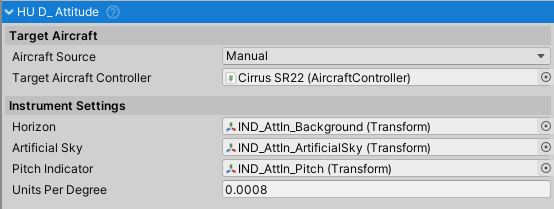
Configuration Properties
Visual Components
Artificial Sky (Transform) - Rotating outer ring showing artificial sky/earth
- Rotates with roll angle
- Usually contains blue (sky) and brown (earth) coloring
- Rotates around Z-axis based on aircraft roll
Horizon (Transform) - Background element without markings
- Stationary or provides reference background
- Defines the primary visual element for horizon detection
Pitch Indicator (Transform) - Pitch/roll ladder with horizon line
- Moves vertically with pitch angle
- Can move horizontally for slip/turn correction
- Usually shows pitch markings (0°, 5°, 10°, etc.)
Scaling Parameters
- Units Per Degree (float) - Movement units per degree of pitch/roll change
- Default: 1.4 (pixels for UI, or meters for 3D)
- 1 pixel per degree typical for UI
- 0.001 units per degree typical for 3D
- Controls sensitivity of pitch/roll display
Pitch and Roll Representation
Roll Display
The artificial sky rotates with aircraft roll angle:
- Roll = 0°: Horizon is level
- Roll = 90°: Horizon is vertical (wings perpendicular)
- Roll = -90°: Horizon is inverted vertical
- Rotation applied around Z-axis
Pitch Display
The pitch indicator moves vertically with pitch angle:
- Pitch = 0°: Indicator centered (level flight)
- Pitch = +30°: Indicator moves up (nose up)
- Pitch = -30°: Indicator moves down (nose down)
- Movement =
pitch * unitsPerDegreepixels/units
Aircraft Source Configuration
Manual Source (default)
- Directly assign
targetAircraftControllerin inspector
- Directly assign
Vehicle Changer Source
- Automatically switches to active vehicle
Setup Instructions
Basic Setup for 3D Cockpit
- Create artificial horizon sphere or background with sky/earth gradient
- Create pitch ladder object with markings
- Create horizon line/cross indicator
- Assign transforms to Artificial Sky, Horizon, and Pitch Indicator
- Set Units Per Degree (typically 1-2 pixels for UI, 0.001 for 3D)
- Assign target aircraft controller
- Test in Play mode by rolling and pitching aircraft
Canvas (UI) Setup
- Create Canvas with Image for background
- Create Image for rotating artificial sky
- Create RectTransform for pitch indicator (moves vertically)
- Assign RectTransforms to the instrument
- Set Units Per Degree to pixel-per-degree sensitivity
Public API
Properties
artificialSky
Type: Transform
Outer ring of the attitude instrument. Shows artificial sky and artificial earth. Rotates with the roll angle to maintain proper horizon orientation. Usually contains blue coloring for sky and brown/tan for earth.
horizon
Type: Transform
Background element without any markings. Provides the reference background for the attitude indicator display. Rotates with roll angle to keep the horizon visually aligned.
pitchIndicator
Type: Transform
The pitch/roll indicator object. Usually displays a ladder with horizon line and pitch values (0°, 5°, 10°, etc.). Moves vertically with pitch angle and horizontally for slip/turn correction. Works with both RectTransforms (UI) and regular Transforms (3D cockpit).
unitsPerDegree
Type: float
Default: 1.4f
Scaling factor for pitch and roll movement. Controls the sensitivity of the pitch/roll display:
- For RectTransforms (UI): Value in pixels per degree. Typical range: 0.5-2.0 pixels per degree
- For Transforms (3D): Value in world units per degree. Typical range: 0.0005-0.002 units per degree
- Default value (1.4) provides reasonable sensitivity for most UI implementations
Inherited Properties
From HUD_Instrument:
targetAircraftController
Type: AircraftController
The aircraft controller that provides pitch and roll data via the Pitch and Roll properties.
aircraftSource
Type: AircraftSource (enum: Manual, VehicleChanger)
Determines how the target aircraft is assigned:
Manual: Manually assign via Inspector or codeVehicleChanger: Automatically tracks active vehicle from VehicleChanger system
Common Usage Patterns
Basic Flight Indication
HUD_Attitude attitudeIndicator = GetComponent<HUD_Attitude>();

// Automatically updates with aircraft orientation
// No code needed for basic operation
Custom Pitch Sensitivity
// Adjust pitch sensitivity
attitudeIndicator.unitsPerDegree = 2.0f;  // More exaggerated pitch movement
Integration with Other Systems
- AircraftController - Source of pitch and roll data
- VehicleChanger - Optional automatic aircraft source switching
- HUD_Instrument - Base class providing common instrument functionality
- Other HUD instruments - Share same aircraft reference
Real-World Context
Attitude Interpretation
- Wings level, pitch 0°: Straight and level flight
- 10° pitch up, wings level: Gentle climb
- 20° bank, pitch 5° up: Banked climb
- 90° bank: Wings perpendicular (knife-edge)
Pilot Training Context
The attitude indicator is one of the six primary flight instruments:
- Airspeed Indicator (speed)
- Attitude Indicator (pitch and roll) ← This component
- Altimeter (altitude)
- Turn Coordinator (turn rate)
- Heading Indicator (direction)
- Vertical Speed Indicator (climb rate)
Troubleshooting
Horizon Not Level in Level Flight
- Verify aircraft pitch/roll return to 0° when level
- Check AircraftController physics configuration
- Verify pitch indicator is centered when aircraft is level
Movement Too Sensitive or Not Sensitive Enough
- Adjust Units Per Degree value
- For UI: Typical 0.5-2.0 pixels per degree
- For 3D: Typical 0.0005-0.002 units per degree
Roll Indicator Rotating Wrong Direction
- Reverse the sign of rotation or adjust transform alignment
Related Classes
HUD_Instrument- Base class for all flight instrumentsAircraftController- Source of pitch and roll dataHUD_Airspeed- Airspeed display instrumentHUD_Altimeter- Altitude display instrumentHUD_Heading- Compass heading indicatorHUD_Turn- Turn rate indicatorHUD_VerticalSpeed- Vertical speed indicator